



Running a dealership without a system leads to lost leads, pricing mistakes, and wasted time. This quick guide shows how a Dealer Management System helps you track costs, manage inventory, and close more deals. You’ll learn how to choose the right DMS, avoid overpaying, and use it to improve profit — especially when buying cars from auctions.
What Is a Dealer Management System (DMS)?
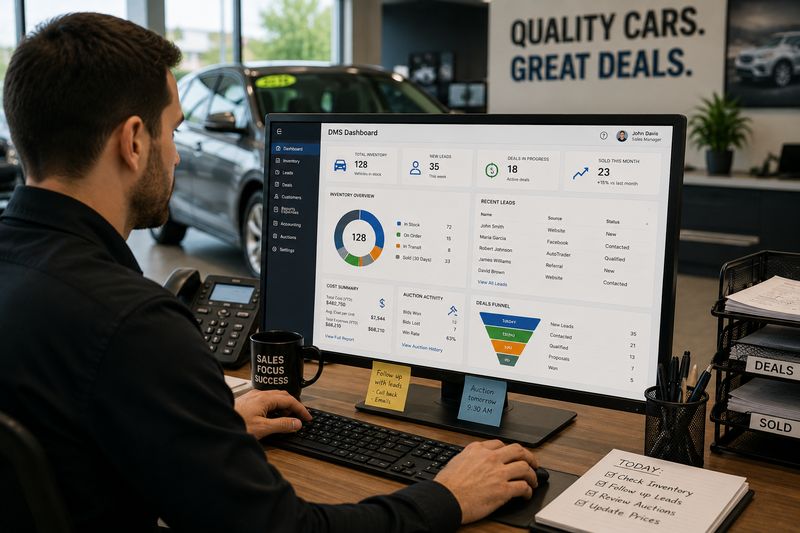
If you run a dealership or buy cars from auctions regularly, you deal with a lot of moving parts — inventory, leads, deals, payments, and paperwork. A Dealer Management System (DMS) helps organize all of this in one place. For budget-focused dealers, it’s not just a tool — it’s a way to reduce mistakes, save time, and control costs.
Definition and Core Purpose
A Dealer Management System (DMS) is software designed to manage all key operations of a dealership.
Its main purpose is to:
- Keep all business data in one system
- Automate daily tasks
- Reduce manual work and errors
Think of it as the “control center” of your dealership.
Example:
Instead of tracking inventory in Excel, customer leads in messages, and deals on paper, a DMS puts everything into one structured system.
For budget dealers, this means:
- Less chaos
- Better control
- Fewer costly mistakes
What Does a Dealer Management System Do?
A DMS handles almost every part of dealership operations.
Key functions include:
- Tracking vehicle inventory (VIN, price, status)
- Managing customer data and leads
- Structuring deals and sales contracts
- Monitoring payments and expenses
- Generating reports and analytics
Example:
You buy a car at auction. The DMS logs:
- Purchase price
- Auction fees
- Transport cost
- Repair estimates
Now you can see the real cost of the vehicle before selling it.
For budget buyers, this helps avoid underpricing or overpaying.
How DMS Software Works in Daily Operations
In daily use, a DMS becomes part of every step of your workflow.
Typical day example:
- You receive a new lead → it’s saved in the system
- You add a vehicle → it appears in inventory
- You create a deal → all costs are calculated automatically
- You follow up with the customer → reminders are set
Instead of switching between tools, everything happens in one place.
Example:
Without a DMS, a dealer forgets to follow up with a buyer. That’s a lost sale.
With a DMS, the system reminds you — increasing your chances to close the deal.
For budget-focused dealers, this means:
- More sales with the same traffic
- Less wasted time
- Better organization
DMS vs CRM: What’s the Difference?
Many dealers confuse DMS and CRM — but they are not the same.
- CRM (Customer Relationship Management) focuses on customers:
- Leads
- Communication
- Follow-ups
- DMS is broader:
- Inventory
- Sales
- Accounting
- Operations
- (Often includes CRM features inside)
Example:
A CRM helps you track a potential buyer.
A DMS helps you track the car, the deal, the payment, and the profit — all together.
Why a Dealer Management System Matters for Used Car Dealers
Running a used car dealership is not simple. You deal with auction purchases, repairs, pricing, leads, and sales — often all at the same time. Without the right system, it’s easy to lose track of costs or miss opportunities. A Dealer Management System (DMS) helps bring structure to daily operations and gives you better control over your business.
Importance of a DMS in a Used Car Dealership
A used car dealership has more variables than a new car business.
You constantly deal with:
- Different vehicle conditions
- Auction purchases with hidden costs
- Repairs and reconditioning
- Changing market prices
A DMS helps you manage all of this in one place.
Example:
You buy 5 cars from an auction. Each has different repair needs and costs. Without a system, it’s easy to lose track. With a DMS, every cost is logged and connected to the vehicle.
For budget dealers, this means:
- Clear visibility of each deal
- Better pricing decisions
- More control over profit margins
Challenges Without a DMS (Manual Work, Errors, Lost Leads)
Without a DMS, most dealers rely on:
- Excel spreadsheets
- Notes on paper
- Messages scattered across phones and apps
This creates problems:
- Manual errors in pricing and calculations
- Missed follow-ups with customers
- Lost leads and sales opportunities
- No clear view of total vehicle cost
Example:
A dealer forgets to include transport and repair costs when pricing a car. The car sells — but profit is lower than expected or even negative.
Another example:
A customer asks about a car, but no follow-up happens. That lead is lost.
For budget-focused dealers, these small mistakes add up quickly.
How DMS Helps Dealers Save Money and Time
A DMS reduces waste in your daily operations.
It helps you:
- Track full vehicle cost (purchase + fees + repairs)
- Automate follow-ups with leads
- Organize inventory and pricing
- Avoid duplicate work and errors
Example:
Instead of calculating costs manually, the system shows total investment instantly. This prevents underpricing and protects your margin.
Time savings also matter:
- Less time on paperwork
- More time closing deals
For small dealers, saving time often means making more money with the same resources.
Why Budget Buyers Benefit from Better Dealer Operations
A well-organized dealership doesn’t just help the dealer — it also benefits the buyer.
When a dealer uses a DMS:
- Pricing is more accurate
- Vehicle history is better tracked
- Deals are processed faster
- Communication is more consistent
Example:
A buyer gets clear information about a car’s cost, condition, and history. This builds trust and reduces risk.
Key Benefits of Using Dealer Management System Software
A Dealer Management System is not just about organization — it directly affects how much money you make and how efficiently you run your dealership. For budget-focused dealers, the right system can turn small improvements into real profit. Below are the key benefits that make a DMS worth considering.
Data Insights and Reporting Accuracy
A DMS gives you clear, real-time data about your business.
You can track:
- Profit per vehicle
- Total cost (purchase + fees + repairs)
- Sales performance
- Inventory turnover
Example:
Without a system, you guess your margins. With a DMS, you see exactly how much you earn on each car.
For budget dealers, accurate data helps:
- Avoid underpricing
- Identify profitable models
- Make better buying decisions at auctions
User-Friendly Organization and Workflow Automation
A DMS organizes everything in one place and automates routine tasks.
This includes:
- Lead tracking
- Follow-up reminders
- Deal creation
- Document storage
Example:
Instead of writing down customer details and forgetting to follow up, the system reminds you automatically.
For small teams, this means:
- Less manual work
- Fewer mistakes
- More consistent operations
Streamlined Costs and Expense Control
One of the biggest advantages is cost control.
A DMS helps you:
- Track every expense per vehicle
- Monitor repair costs
- See total investment before selling
Example:
You buy a car for $6,000, but after fees and repairs it costs $8,500. Without tracking, you might price it too low. With a DMS, you know your real cost.
For budget dealers, this prevents:
- Losing money on deals
- Unexpected expenses
- Poor pricing decisions
Improved Inventory Management
Managing inventory becomes much easier with a DMS.
You can:
- Track all vehicles by VIN
- Update pricing quickly
- See which cars sell faster
- Identify slow-moving inventory
Example:
A car sits too long on the lot. The system shows it’s not selling, so you adjust the price or marketing strategy.
For budget dealers, faster turnover means:
- More cash flow
- Less money tied up in inventory
Faster Sales and Deal Processing
Speed matters in sales.
A DMS allows you to:
- Create deals quickly
- Calculate pricing instantly
- Generate documents automatically
Example:
A customer is ready to buy. Instead of spending 30 minutes preparing paperwork, you complete the deal in minutes.
For budget-focused operations, faster deals mean:
- More sales per day
- Better customer experience
- Less lost opportunities
Better Customer Experience and Retention
A DMS helps you stay organized with customers.
You can:
- Track communication history
- Set follow-up reminders
- Personalize offers
Example:
A customer shows interest but doesn’t buy. The system reminds you to follow up a few days later — increasing the chance of closing the deal.
For budget dealers, keeping customers engaged is cheaper than finding new ones.
Scalability for Growing Dealerships
As your business grows, manual processes stop working.
A DMS allows you to:
- Handle more vehicles
- Manage more leads
- Add employees without chaos
Example:
You go from selling 10 cars a month to 30. Without a system, things break down. With a DMS, operations stay organized.
For small dealers, this means you can grow without losing control.
Higher Profit Margins on Low-Budget Vehicles
Budget vehicles often have small margins — and that’s where mistakes hurt the most.
A DMS helps you:
- Track every dollar spent
- Price cars correctly
- Avoid hidden costs
Example:
On a $7,000 car, even a $300 mistake reduces profit significantly. A DMS helps prevent these errors.
Core Features of Dealer Management System Software
A good Dealer Management System is not just one tool — it’s a set of features that work together to run your entire dealership. For budget-focused dealers, the goal is to use these features to reduce manual work, avoid mistakes, and control costs. Below are the core features you should expect from any solid DMS.
Inventory Management (Vehicle Tracking, VIN, Pricing)
Inventory is the heart of your dealership.
A DMS helps you:
- Track every vehicle by VIN
- Store purchase price, fees, and repair costs
- Update pricing in real time
- Monitor how long a car sits in inventory
Example:
You buy a car at auction. The system logs the VIN, cost, and status. As you add repair costs, the total investment updates automatically.
For budget dealers, this prevents underpricing and helps maximize profit.
Customer Relationship Management (CRM)
Most DMS platforms include built-in CRM functionality.
This allows you to:
- Store customer details
- Track communication history
- Manage inquiries and deals
Example:
A customer contacts you about a car. Instead of losing the conversation in messages, it’s saved in the system for future follow-up.
For small dealers, this keeps everything organized without needing separate tools.
Lead Management and Follow-Ups
Leads are potential sales — but only if you follow up.
A DMS helps you:
- Track all incoming leads
- Assign follow-up tasks
- Set reminders automatically
Example:
A customer asks about financing but doesn’t respond. The system reminds you to follow up in a few days.
For budget dealers, this means:
- More conversions without extra advertising
- Fewer missed opportunities
Sales Automation and Deal Structuring
Creating deals manually takes time and can lead to errors.
A DMS automates:
- Pricing calculations
- Taxes and fees
- Deal structuring
Example:
Instead of calculating everything on paper, the system generates a complete deal instantly.
For dealers, this means:
- Faster closing
- Fewer mistakes
- More professional process
Accounting and Financial Management
Tracking money is critical — especially with tight margins.
A DMS helps you:
- Monitor income and expenses
- Track profit per vehicle
- Manage payments and balances
Example:
You can see exactly how much you made on each car, including all costs.
For budget-focused dealers, this clarity is key to staying profitable.
Credit Applications and Financing Tools
Many DMS platforms include financing tools.
These allow you to:
- Process credit applications
- Connect with lenders
- Structure financing deals
Example:
A customer wants to finance a car. Instead of sending them elsewhere, you handle everything in one system.
This helps:
- Increase sales
- Improve customer experience
Service and Repair Management
Repairs are part of every used car business.
A DMS helps you:
- Track repair orders
- Monitor costs
- Schedule service tasks
Example:
A car needs brakes and tires. The system logs the work and updates the total cost of the vehicle.
For budget dealers, this ensures:
- No hidden repair expenses
- Accurate pricing
Employee and Role Management
As your dealership grows, managing people becomes important.
A DMS allows you to:
- Assign roles and permissions
- Track employee performance
- Control access to data
Example:
Sales staff can access leads and deals, while accounting handles financial data.
This improves:
- Security
- Efficiency
- Accountability
Marketing Tools and Campaign Tracking
Some DMS platforms include basic marketing tools.
You can:
- Track where leads come from
- Manage campaigns
- Measure performance
Example:
You run ads on multiple platforms. The system shows which one brings more leads.
For budget dealers, this helps:
- Avoid wasting money on ineffective ads
- Focus on what works
Reporting and Analytics Dashboards
Data is only useful if you can understand it.
A DMS provides dashboards that show:
- Sales performance
- Inventory turnover
- Profit margins
- Lead conversion rates
Example:
You notice that certain cars sell faster and bring higher profit. This helps you adjust your buying strategy.
For budget dealers, better data leads to smarter decisions.
Vehicle Acquisition and Auction Integration
For dealers who buy from auctions, this feature is critical.
A DMS can:
- Track auction purchases
- Store vehicle history and reports
- Calculate total cost (bid + fees + transport + repairs)
Example:
You win a car at auction. The system immediately logs all related costs, giving you a clear picture of your investment.
Know the Real Cost of Every Vehicle Before You Sell
A DMS helps you track costs — but the right data starts at the auction. With BidNDrive, you get access to real vehicle history, pricing data, and auction insights so you can make smarter buying decisions from the start.
- ✅ Free vehicle history reports with past sales and photos
- ✅ Real auction price data to avoid overpaying
- ✅ Access to 200,000+ vehicles across major auctions
- ✅ Better decision-making before you even add a car to inventory
Advanced and Less Common DMS Features
Basic DMS features help you run your dealership. Advanced features help you compete and save even more money. Not every small dealer needs all of them, but some can make a big difference — especially if you buy from auctions or manage multiple deals at once.
AI-Based Pricing and Market Analysis
Some modern DMS platforms use AI to analyze market data.
They can:
- Compare similar vehicles in your area
- Suggest optimal pricing
- Track market trends
Example:
You buy a car at auction and don’t know the best selling price. The system analyzes similar listings and suggests a competitive price range.
For budget dealers, this helps:
- Avoid overpricing (slow sales)
- Avoid underpricing (lost profit)
Embedded Text Messaging and Communication Tools
Communication is key to closing deals.
Advanced DMS systems include:
- Built-in SMS messaging
- Email integration
- Conversation tracking
Example:
A customer asks about a car. You reply via text directly from the system, and the conversation is saved automatically.
This helps:
- Keep all communication in one place
- Avoid lost messages
- Improve follow-up consistency
Online Payment Processing and eSignatures
Some systems allow you to complete deals online.
Features include:
- Accepting payments digitally
- Sending contracts for eSignature
- Finalizing deals remotely
Example:
A customer agrees to buy but can’t visit the dealership immediately. You send documents and payment links — the deal is completed without delay.
For budget dealers, this means:
- Faster sales
- Fewer missed opportunities
Integration with Auction Platforms (Copart, IAAI)
For dealers working with auctions, integration is a major advantage.
A DMS can connect with platforms like Copart and Insurance Auto Auctions.
This allows you to:
- Import vehicle data automatically
- Track auction purchases
- Store history and reports
Example:
Instead of manually entering vehicle details, the system pulls data directly from the auction.
For budget buyers, this saves time and reduces errors.
Multi-Location and Multi-User Management
As your business grows, managing multiple locations or employees becomes complex.
Advanced DMS systems allow:
- Multiple locations in one system
- User roles and permissions
- Centralized reporting
Example:
You operate two lots. The system shows inventory and sales for both locations in one dashboard.
This helps:
- Keep operations organized
- Avoid confusion between locations
Mobile Access and Cloud-Based Systems
Modern DMS platforms are often cloud-based and accessible from anywhere.
Benefits include:
- Access from phone, tablet, or laptop
- Real-time updates
- No need for local installation
Example:
You are at an auction and need to check inventory or pricing. You open your phone and access everything instantly.
For budget dealers, this means:
- Flexibility
- Faster decisions
- Lower IT costs
Compliance and Document Automation
Paperwork is a big part of dealership operations.
Advanced DMS systems help:
- Generate contracts automatically
- Store documents digitally
- Ensure compliance with regulations
Example:
Instead of preparing documents manually, the system creates them based on deal data.
How Dealer Management Systems Work with Auto Auctions
If you buy cars from auctions regularly, a DMS becomes even more valuable. Auctions involve multiple steps — bidding, fees, transport, repairs, and resale. Without a system, it’s easy to lose track of costs or make mistakes. A DMS helps you manage the entire process from purchase to sale in one place.
Managing Auction Purchases in One System
A DMS allows you to track every auction purchase from the moment you win a bid.
You can:
- Add the vehicle instantly to inventory
- Store purchase details (lot number, VIN, auction source)
- Track status (purchased, in transit, in repair, ready for sale)
Example:
You win 3 cars in one day from different auctions. Instead of tracking them manually, each vehicle is logged in the system with full details.
For budget dealers, this means:
- Better organization
- No lost information
- Faster workflow
Tracking Vehicle History and Reports
Auction cars often come with history reports and condition data.
A DMS helps you:
- Store vehicle history reports
- Track previous damage or ownership
- Keep inspection notes in one place
Example:
Before pricing a car, you review its history directly in the system instead of searching through emails or files.
This improves:
- Transparency
- Decision-making
- Confidence when selling
Cost Breakdown: Auction Fees, Transport, Repairs
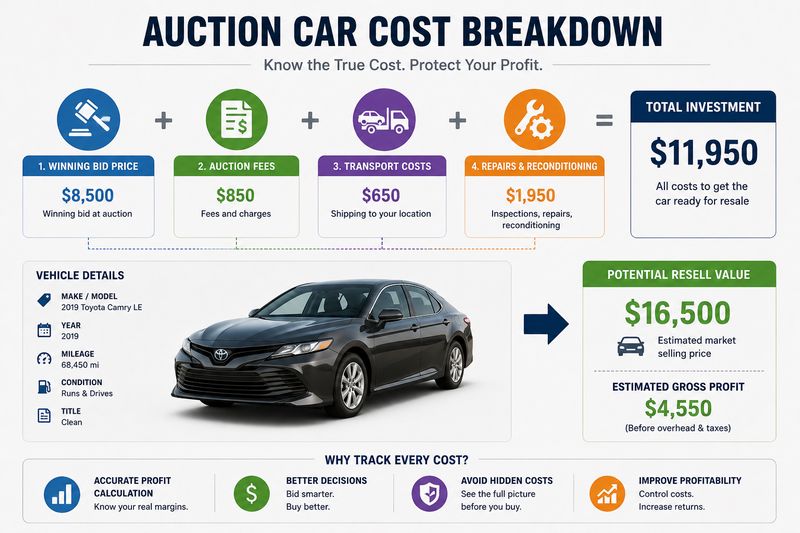
One of the biggest challenges with auction cars is calculating the real cost.
A DMS tracks:
- Winning bid price
- Auction fees
- Transport costs
- Repair and reconditioning expenses
Example:
You buy a car for $6,000. After fees, shipping, and repairs, the total cost becomes $8,200. The system shows this clearly.
For budget dealers, this is critical:
- Prevents underpricing
- Protects profit margins
- Helps you decide if a deal is worth it
Export and Logistics Coordination
If you export vehicles or move them between locations, logistics can get complex.
A DMS helps you:
- Track shipping status
- Manage documents (titles, invoices, export papers)
- Coordinate transport timelines
Example:
A car is being shipped from an auction yard to a port. The system tracks each step, so you always know where the vehicle is.
For dealers working with international buyers, this reduces:
- Delays
- Miscommunication
- Lost paperwork
Reducing Risks When Buying Salvage Vehicles
Salvage vehicles can offer big savings — but also higher risk.
A DMS helps reduce that risk by:
- Tracking damage details
- Storing inspection reports
- Calculating total repair cost
Example:
A car looks cheap at auction, but after adding estimated repairs, the system shows it’s not profitable.
Top Dealer Management System Software in 2026
There are many DMS platforms on the market, but not all are suitable for budget-focused dealers. Some systems are built for large dealerships with big budgets, while others are more flexible and affordable. Below are popular DMS solutions in 2026, with a focus on what they offer and who they are best for.
Podium
Podium is known more for communication and customer interaction than full dealership management.
Key strengths:
- Messaging and lead communication
- Customer engagement tools
- Review and reputation management
Best for:
- Dealers who want to improve communication and close more leads
Limitation:
- Not a full DMS — works better as an add-on tool
CDK Global
CDK Global is one of the largest and most established DMS providers.
Key strengths:
- Full dealership management
- Strong accounting and reporting
- Enterprise-level features
Best for:
- Large dealerships with complex operations
Limitation:
- Expensive and often too complex for small budget dealers
Dealertrack DMS
Dealertrack offers a complete DMS with strong integration capabilities.
Key strengths:
- Inventory, sales, and financing tools
- Integration with lenders and services
- Scalable platform
Best for:
- Medium to large dealerships
Limitation:
- Can be costly and require training
Tekion
Tekion is a modern, cloud-based DMS built for flexibility.
Key strengths:
- Clean interface and user-friendly design
- Real-time data and cloud access
- Strong automation features
Best for:
- Dealers looking for a modern system
Limitation:
- Pricing may be high for smaller operators
DealerCenter
DealerCenter is one of the most popular choices for independent dealers.
Key strengths:
- Affordable pricing
- Easy to use
- Strong auction integration
- Built-in CRM and inventory tools
Best for:
- Small to mid-size dealers
- Budget-focused operations
Example:
A small dealer buying from auctions can track inventory, leads, and deals in one simple system.
VinSolutions
VinSolutions focuses heavily on CRM and customer management.
Key strengths:
- Strong lead tracking
- Customer communication tools
- Sales process management
Best for:
- Dealers who want to improve sales conversion
Limitation:
- Not as strong in full DMS functionality compared to others
DealerSocket
DealerSocket combines CRM and DMS features.
Key strengths:
- Lead management and sales tools
- Customer tracking
- Flexible system
Best for:
- Dealers who need both CRM and operational tools
Limitation:
- Can feel complex for smaller teams
PBS Systems
PBS Systems is a full-service DMS with strong backend capabilities.
Key strengths:
- Accounting and financial management
- Inventory and service tracking
- Customizable features
Best for:
- Dealers who want deep control over operations
Limitation:
- Higher cost and learning curve
Nextlane
Nextlane (formerly part of Cox Automotive solutions) offers modern DMS features.
Key strengths:
- Cloud-based platform
- Flexible tools
- Integration with automotive services
Best for:
- Dealers looking for a scalable, modern system
Limitation:
- May require customization to fit smaller operations
incadea
incadea is widely used internationally and focuses on structured dealership processes.
Key strengths:
- Strong process control
- Integration with enterprise systems
- Global presence
Best for:
- Larger or international dealerships
Limitation:
- Less suited for small, budget-focused dealers
BiT Dealer Management System
BiT DMS is a simpler, more flexible solution.
Key strengths:
- Affordable pricing
- Basic inventory and sales tools
- Easy setup
Best for:
- Small dealerships or beginners
Example:
A new dealer can start with BiT to manage basic operations without large upfront costs.
Stop Guessing — Use Real Auction Data
Even the best DMS won’t help if your input data is wrong. BidNDrive gives you real auction insights, sold price history, and vehicle details — so every deal you enter into your system is based on accurate information.
- ✅ Real sold vehicle price reports
- ✅ Tools to estimate true market value
- ✅ Better control over bidding strategy
- ✅ Reduced risk when buying salvage vehicles
How to Choose the Best Dealer Management System
Choosing a DMS is a big decision, especially for budget-focused dealers. The wrong system can waste money, slow down your team, and create more problems than it solves. The right one helps you stay organized, control costs, and grow. Here’s how to make a smart choice.
Assess Your Dealership’s Needs and Budget
Start with your real needs — not features you “might use later.”
Ask yourself:
- How many cars do I handle per month?
- Do I need inventory + CRM + accounting, or just basics?
- What is my monthly budget?
Example:
A small dealer selling 10–20 cars per month doesn’t need an expensive enterprise system. A simple, affordable DMS with core features is enough.
For budget buyers:
- Pay for what you use
- Avoid overbuilt systems
Cloud-Based vs On-Premise Solutions
There are two main types of DMS:
Cloud-based:
- Works in a browser
- Accessible from anywhere
- Lower upfront cost
On-premise:
- Installed locally
- Requires hardware and IT support
- Higher upfront investment
Example:
A dealer who buys cars at auctions needs mobile access. Cloud-based systems allow checking inventory and deals from a phone.
For most small and budget dealers:
- Cloud-based is the better option
Integration with Existing Tools and Auctions
Your DMS should connect with the tools you already use.
Look for:
- Auction integration
- Vehicle history reports
- Transport and logistics tools
Example:
You buy cars from auctions. A DMS that imports vehicle data automatically saves time and reduces errors.
Without integration:
- You manually enter data
- More chances for mistakes
For auction buyers, integration is a must-have feature.
Ease of Use and Staff Training Requirements
A powerful system is useless if your team can’t use it.
Check:
- Interface simplicity
- Learning curve
- Training required
Example:
A system with too many features can confuse staff and slow down daily work.
For small teams:
- Simple and intuitive systems work best
- Faster adoption = faster results
Scalability and Future Growth
Even if you’re small today, think about growth.
Your DMS should:
- Handle more inventory
- Support more users
- Adapt as your business expands
Example:
You start with 10 cars per month, then grow to 40. Switching systems later can be costly and time-consuming.
For budget dealers:
- Choose a system that can grow with you
Customer Support and Onboarding
Support matters more than most people think.
Look for:
- Fast response times
- Clear onboarding process
- Training materials and help resources
Example:
If something breaks and you can’t get support, your entire operation slows down.
For budget-focused dealers:
- Good support saves time and prevents costly mistakes
Data Security and Compliance
Your DMS stores sensitive data:
- Customer information
- Financial records
- Deal documents
Make sure the system offers:
- Secure data storage
- Backup systems
- Compliance with regulations
Example:
Losing customer or deal data can create legal and financial problems.
Questions to Ask Before Choosing a DMS
Before you commit to any DMS, ask the right questions. A demo can look impressive, but real value shows up in daily use, costs, and support. For budget-focused dealers, these questions help avoid expensive mistakes and choose a system that actually fits your workflow.
Will the Provider Continue to Improve the Software?
Software should evolve with the market.
Ask:
- How often are updates released?
- Are new features included or paid add-ons?
- Do they fix bugs quickly?
Example:
A system that hasn’t been updated in a year may fall behind on integrations or compliance.
For budget dealers:
- Ongoing updates = longer lifespan
- Less need to switch systems later
Does It Support Messaging and Customer Communication?
Deals are won or lost in communication.
Check if the DMS includes:
- SMS and email integration
- Conversation tracking
- Automated follow-ups
Example:
A lead comes in after hours. The system sends an auto-reply and schedules a follow-up for the morning. That increases your chance to close.
Without this:
- Leads get lost
- Follow-ups are inconsistent
How Secure Is My Dealership Data?
Your DMS holds sensitive information.
Ask about:
- Data encryption
- Backups and recovery
- Access control (user roles)
Example:
If a system crashes or data is lost, you could lose deals, customer records, and financial data.
For any dealer:
- Strong security is essential, not optional
Does the Provider Understand the Used Car Market?
Not all DMS platforms are built for used car dealers.
Ask:
- Do they support auction workflows?
- Can they track repair costs and reconditioning?
- Do they handle variable pricing?
Example:
A system built for new car dealerships may not handle auction purchases or salvage vehicles well.
For budget dealers:
- Choose a system designed for how you actually work
What Are the Total Costs (Hidden Fees, Add-Ons)?
The price you see is not always the final price.
Ask about:
- Setup fees
- Per-user costs
- Add-ons (CRM, reports, integrations)
- Contract length
Example:
A system costs $100/month, but after adding features, it becomes $300/month.
For budget buyers:
- Calculate total monthly cost before committing
- Avoid systems with too many paid extras
Can It Handle High Volume Auction Purchases?
If you buy from auctions, this is critical.
Check if the system can:
- Import multiple vehicles quickly
- Track auction data and costs
- Handle large inventory updates
Example:
You win 10 cars in one day. A good DMS lets you upload and manage them quickly. A weak system slows you down.
Common Mistakes When Choosing a DMS
Choosing a DMS is a long-term decision. Many dealers rush the process and end up with a system that costs more, slows them down, or doesn’t fit their workflow. For budget-focused dealers, avoiding these common mistakes can save both time and money.
Choosing Based on Price Only
Price matters — but choosing the cheapest option can backfire.
Low-cost systems often:
- Lack important features
- Have limited support
- Require manual work outside the system
Example:
A dealer picks the cheapest DMS to save $100/month. But later spends hours manually tracking costs and loses deals due to poor organization.
For budget dealers:
- Focus on value, not just price
- A slightly higher cost can save more money long-term
Ignoring Integration with Auctions and Transport
If you buy cars from auctions, integration is critical.
Without it:
- You manually enter vehicle data
- You track transport separately
- More errors and wasted time
Example:
A dealer buys multiple cars weekly but must enter every detail by hand. This slows down operations and increases mistakes.
For auction-based dealers:
- Always choose a system that connects with auctions and logistics tools
Overpaying for Features You Don’t Need
Some DMS platforms offer many advanced features — but not all are useful for small dealers.
Common mistake:
- Paying for enterprise-level tools you never use
Example:
A small dealership pays for advanced analytics, multi-location tools, and custom reporting — but only uses basic inventory and CRM.
For budget buyers:
- Start with essential features
- Upgrade only when needed
Not Testing the System Before Buying
Many dealers skip testing and rely only on demos.
Problem:
- A demo shows best-case scenarios
- Real usage may be different
Example:
A system looks easy in a demo, but daily use is slow and confusing.
Before choosing:
- Request a trial or live demo
- Test real workflows (inventory, deals, follow-ups)
For budget dealers:
- Testing prevents costly mistakes
Poor Staff Training and Adoption
Even the best system fails if your team doesn’t use it properly.
Common issues:
- Staff avoids using the system
- Data is incomplete or inconsistent
- Work returns to manual methods
Example:
A dealer installs a DMS, but employees keep using notes and spreadsheets. The system becomes useless.
Cost of Dealer Management System Software
Understanding the real cost of a DMS is critical, especially for budget-focused dealers. The price you see upfront is only part of the story. A good system should not just cost money — it should help you save more than you spend. Let’s break down what you actually pay and how to evaluate the value.
Typical Pricing Models (Subscription vs One-Time)
Most DMS platforms use one of two pricing models.
Subscription (monthly or yearly):
- Pay a fixed monthly fee
- Includes updates and support
- Lower upfront cost
One-time purchase (less common today):
- Higher upfront payment
- May require extra fees for updates or support
Example:
A cloud-based DMS might cost $100–$300 per month depending on features and users.
For budget dealers:
- Subscription models are usually better
- Easier to start without large upfront investment
Hidden Costs to Watch For
The base price is not always the final price.
Common hidden costs:
- Setup or onboarding fees
- Per-user charges
- Add-ons (CRM, reports, integrations)
- Training costs
- Contract commitments
Example:
A system advertised at $99/month becomes $250/month after adding essential features.
For budget buyers:
- Always ask for full pricing breakdown
- Calculate total monthly cost before signing
ROI: How a DMS Pays for Itself
A DMS should generate value — not just add expense.
It pays for itself by:
- Preventing underpricing on vehicles
- Reducing manual errors
- Increasing lead conversion
- Saving time on daily tasks
Example:
You avoid underpricing just one car by $500 because the system shows full cost. That alone can cover several months of DMS subscription.
Another example:
Better follow-ups help you close 1 extra deal per month — increasing revenue without extra marketing spend.
For budget dealers:
- Even small improvements create strong ROI
Budget-Friendly Options for Small Dealers
Not every dealer needs an expensive system.
Affordable options typically offer:
- Basic inventory management
- CRM and lead tracking
- Simple reporting
Example:
A small dealer selling 10–20 cars per month can run efficiently on a $100–$200/month system instead of paying for enterprise-level tools.
Best DMS Strategies for Budget-Focused Dealers
Having a DMS is one thing — using it correctly is what actually saves money. Many dealers install a system but only use 20–30% of its potential. For budget-focused dealers, smart usage strategies can directly improve profit, reduce risk, and increase efficiency without increasing expenses.
Start with Essential Features Only
You don’t need every feature from day one.
Focus on:
- Inventory tracking
- Basic CRM
- Cost tracking
- Deal management
Example:
A small dealer buys a full-feature DMS but only needs inventory and lead tracking. The extra tools add cost but no value.
Smart approach:
- Start simple
- Add features as your business grows
For budget dealers:
- Keep costs low
- Avoid paying for unused tools
Use Data to Avoid Overpaying at Auctions
Auction buying is where many dealers lose money.
A DMS helps you:
- Compare past purchase prices
- Track profit per vehicle
- Analyze which cars perform best
Example:
You notice that certain models consistently bring lower profit after repairs. Next time, you avoid bidding too high on them.
For budget buyers:
- Data replaces guesswork
- Better buying decisions = higher margins
Automate Repetitive Tasks to Save Time
Time is money, especially in a small dealership.
Use your DMS to automate:
- Follow-ups with leads
- Deal calculations
- Inventory updates
- Document generation
Example:
Instead of manually messaging every lead, the system sends reminders and scheduled follow-ups automatically.
For budget dealers:
- Less time on routine tasks
- More time closing deals
Track Total Vehicle Cost (Purchase + Fees + Repairs)
One of the biggest mistakes is focusing only on the purchase price.
A DMS helps you track:
- Auction price
- Fees
- Transport
- Repairs
Example:
A car looks cheap at $5,500. After all costs, it reaches $7,800. Without tracking, you might price it too low and lose profit.
For budget-focused dealers:
- Always base pricing on total cost
- Protect your margins on every deal
Improve Lead Conversion Without Extra Ad Spend
You don’t always need more leads — you need to convert the ones you already have.
A DMS helps you:
- Track every lead
- Follow up consistently
- See which leads convert
Example:
A dealer gets 20 leads per month but closes only 3 deals. After using automated follow-ups, they close 5–6 deals without increasing ad spend.
Final Thoughts: Is a Dealer Management System Worth It?
A Dealer Management System is not just another tool — it’s a decision that affects how efficiently you run your business. For budget-focused dealers, the question is simple: will it help you save money and increase profit? In most cases, the answer is yes — if you choose the right system and use it correctly.
When You Really Need a DMS
You don’t need a DMS on day one — but you quickly reach a point where manual work stops working.
You likely need a DMS if:
- You handle multiple cars at the same time
- You buy regularly from auctions
- You lose track of costs or inventory
- You miss leads or forget follow-ups
Example:
At first, you manage 5 cars with notes and spreadsheets. Then you grow to 20 cars, and things become messy — costs are unclear, leads are missed, and deals slow down.
That’s when a DMS becomes necessary, not optional.
How to Get Started Without Overspending
You don’t need an expensive system to get started.
Smart approach:
- Choose a budget-friendly DMS with core features
- Avoid unnecessary add-ons
- Start with one or two users
- Upgrade only when needed
Example:
Instead of paying $400/month for a full enterprise system, you start with a $100–$150/month solution that covers inventory, leads, and deal tracking.
For budget dealers:
- Keep initial costs low
- Focus on tools that directly impact profit
Why the Right System Helps You Win at Auto Auctions
Auto auctions are competitive, and margins can be tight.
A DMS gives you an advantage by:
- Tracking total vehicle cost in real time
- Helping you avoid overbidding
- Identifying profitable vehicle types
- Organizing multiple purchases at once
Example:
Two dealers buy the same car. One guesses the total cost, the other uses a DMS and knows exact numbers. The second dealer prices correctly and makes a better profit.
Turn Better Data Into Better Deals
A DMS helps you manage your dealership — BidNDrive helps you feed it with the right data. Get access to auction inventory, pricing insights, and tools that help you buy smarter, reduce risk, and increase profit on every vehicle.
- ✅ Direct access to Copart, IAAI, and dealer-only auctions
- ✅ Bid online without a dealer license
- ✅ Analyze vehicles before bidding
- ✅ Support from purchase to delivery
Further Reading:
Car Dealership Accounting: Complete Guide for Dealers and Auction Buyers
Vehicle Acquisition: Complete Guide to Buying Cars Smart and Saving Money
Dealer Principal: Role, Responsibilities, and How to Succeed in the Auto Business
Facebook Ads for Car Dealerships: Complete Guide to Getting More Buyers
Frequently Asked Questions
- What is a Dealer Management System and do small dealers really need it?
- How much does a DMS cost for a small used car dealership?
- Can a DMS help me make more profit when buying cars at auctions?
- What features are most important in a DMS for budget-focused dealers?