



Google Vehicle Listing Ads help dealerships and auto auctions put real inventory in front of buyers who are ready to shop. This guide explains how the platform works, how to set up and optimize your vehicle feed, avoid common mistakes, and generate more qualified leads. Whether you run a local dealership or an online auction like BidNDrive, you'll learn practical strategies to improve visibility and increase sales.
What Are Google Vehicle Listing Ads?
Google Vehicle Listing Ads help car dealerships and automotive businesses show vehicles directly in Google search results. Instead of displaying only text, these ads include photos, prices, mileage, and other important details that shoppers want to see before clicking. For buyers looking for affordable vehicles, this makes it much easier to compare options without visiting dozens of websites. For dealerships and auto auction companies, Vehicle Listing Ads create another way to reach people who are actively searching for a vehicle to buy.
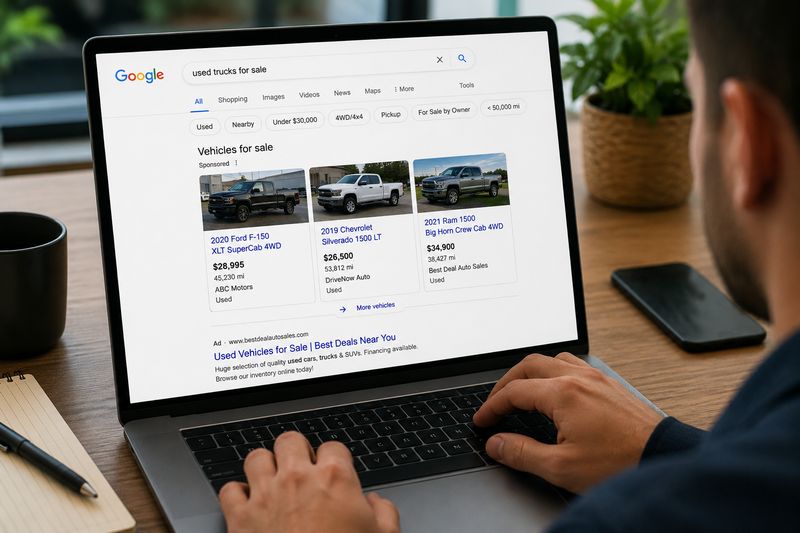
Definition of Google Vehicle Listing Ads
Google Vehicle Listing Ads (VLAs) are a vehicle-specific advertising format that allows eligible dealerships to promote their inventory on Google. Each ad is generated from a vehicle inventory feed submitted through Google Merchant Center and connected to a Google Ads account.
Unlike traditional search ads, Vehicle Listing Ads focus on individual vehicles rather than general dealership services. Every listing represents a specific vehicle currently available for sale.
A typical Vehicle Listing Ad may display:
- Vehicle photo
- Year, make, and model
- Selling price
- Mileage
- Vehicle condition
- Dealer name
- Vehicle location
For example, someone searching for "used Ford F-150 near me" may immediately see several available trucks with prices and photos before opening any dealership website. Instead of reading advertisements first, the shopper can compare actual inventory.
This is especially helpful for buyers with limited budgets who want to find the best value quickly. Seeing real prices upfront helps them narrow their options before spending time contacting dealers.
How Vehicle Listing Ads Work
Vehicle Listing Ads work by connecting a dealership's inventory with Google's advertising platform.
The process usually follows these steps:
- The dealership uploads its inventory to Google Merchant Center using a vehicle feed.
- The inventory feed contains information about every vehicle.
- Google regularly checks the feed for updates.
- The Merchant Center account is connected to Google Ads.
- Google matches available vehicles with relevant customer searches.
- Eligible vehicles appear as Vehicle Listing Ads in search results.
- When shoppers click an ad, they are taken directly to the vehicle detail page on the dealer's website.
This process is mostly automated.
For example, imagine a dealership adds a 2022 Toyota Camry priced at $22,500 to its inventory. Once the inventory feed updates, Google can begin showing that vehicle to users searching for similar cars.
If the car sells and the dealership updates its inventory, Google can remove the listing automatically. This helps reduce customer frustration caused by clicking on vehicles that are no longer available.
Where Vehicle Ads Appear in Google Search Results
Vehicle Listing Ads appear in several locations across Google, depending on the user's search and device.
Common placements include:
- Google Search results
- Automotive shopping experiences on Google
- Mobile search results
- Desktop search results
- Vehicle search modules
- Local shopping experiences
A shopper may search for:
- Used Honda Civic near me
- Toyota Tacoma under $25,000
- Certified used SUV
- Used pickup trucks for sale
Instead of seeing only blue website links, Google may display a row of vehicles with large images, prices, mileage, and dealership information.
This creates a shopping experience similar to browsing an online marketplace.
For budget-conscious buyers, this saves time. Instead of opening ten dealership websites, they can compare multiple vehicles directly in Google's results before deciding which listings deserve a closer look.
Google Vehicle Ads vs Traditional Search Ads
Traditional Google Search Ads and Vehicle Listing Ads both appear in search results, but they work very differently.
Traditional search ads promote a business or service using headlines and text.
A traditional dealership ad might say:
- "Used Cars for Sale"
- "Affordable SUVs"
- "Huge Inventory"
- "Visit Our Dealership Today"
The shopper must click the ad before seeing the available vehicles.
Vehicle Listing Ads are inventory-driven.
Instead of advertising the dealership itself, they advertise actual vehicles.
For example, a Vehicle Listing Ad may immediately show:
- 2021 Honda CR-V
- $24,900
- 38,000 miles
- Dealer photo
- Vehicle image
- Dealer location
This gives shoppers much more information before they click.
Vehicle Listing Ads also tend to match stronger purchase intent. Someone searching for a specific year, make, model, or price range is often much closer to buying than someone making a general search like "used car dealer."
Many dealerships use both formats together. Search Ads help build brand awareness, while Vehicle Listing Ads help sell individual inventory.
Why Vehicle Listing Ads Matter for Dealerships
For dealerships, inventory is constantly changing. Vehicles are added, sold, traded, and removed every day. Vehicle Listing Ads help display that inventory to shoppers who are already searching for vehicles online.
Some of the biggest advantages include:
- More visibility for available inventory
- Higher-quality website traffic
- Better-qualified leads
- Improved local exposure
- Easier inventory promotion
- Faster sales for newly listed vehicles
- Better use of advertising budgets
For example, a small independent dealership may only have 40 vehicles available. Competing against large dealer groups can be difficult.
Vehicle Listing Ads help level the playing field.
If the dealership has a well-priced vehicle that matches what shoppers are searching for, Google can display it alongside listings from much larger competitors.
This is especially valuable for dealerships selling affordable vehicles.
A buyer searching for "used Nissan Altima under $15,000" is already focused on price. If your inventory matches that search, your vehicle has an opportunity to appear regardless of how large your dealership is.
The same idea applies to online auto auction companies like BidNDrive. Buyers often begin their search on Google before deciding where to purchase a vehicle. Showing inventory early in the buying process increases the chance that shoppers visit the auction platform before choosing a retail dealership.
Compare Auction Prices Before Paying Retail
Many shoppers discover vehicles through Google Search, but dealership prices are only one option. BidNDrive gives you access to online auto auctions where you can compare thousands of vehicles, estimate total costs, and potentially save money before making your purchase.
- ✅ Access thousands of auction vehicles from major U.S. auctions
- ✅ Free membership with unlimited vehicle searches
- ✅ Cost estimation tools for shipping and auction fees
- ✅ Support from registration to vehicle delivery
How Shoppers Interact with Vehicle Ads
Vehicle Listing Ads are designed for shoppers who already know what they want—or at least have a good idea.
Many users search by:
- Budget
- Make
- Model
- Body style
- Mileage
- Vehicle condition
- Fuel type
- Location
For example, a first-time buyer with a $10,000 budget may search for "used Toyota Corolla under $10,000." Another shopper may search for "Ford F-150 crew cab near me."
When Google finds matching inventory, the shopper can quickly compare several vehicles without leaving the search page.
Most shoppers follow a similar buying journey:
- Search for a vehicle.
- Compare prices and photos.
- Open several listings.
- Review specifications.
- Visit the dealer's website.
- Check financing or payment options.
- Contact the dealership or schedule a visit.
Because Vehicle Listing Ads display detailed information before the click, the people who visit the dealership's website are often better qualified than visitors from general advertising campaigns.
How Google Vehicle Listing Ads Work
Google Vehicle Listing Ads rely on accurate vehicle data, automated inventory updates, and Google's advertising platform to connect shoppers with available vehicles. Once everything is set up correctly, Google can display individual cars, trucks, SUVs, and vans to people searching for them. The system works almost entirely automatically, making it easier for dealerships and auto auction companies to keep their online inventory visible without creating separate ads for every vehicle.
Vehicle Inventory Feeds and Data Synchronization
The foundation of Google Vehicle Listing Ads is the vehicle inventory feed. This is a structured file that contains information about every vehicle a dealership wants to advertise.
A typical inventory feed includes:
- Year
- Make
- Model
- Trim
- VIN
- Price
- Mileage
- Vehicle condition
- Availability
- Dealer information
- Vehicle images
- Landing page URL
Google regularly reads this feed to determine which vehicles are available.
Whenever a dealership adds a new vehicle, changes a price, updates mileage, or sells a car, the feed should also update. This process is called data synchronization.
For example, a dealership receives three used SUVs from an auction. After adding them to the inventory management system, the feed updates automatically. Google then becomes aware of the new vehicles and may begin displaying them in search results.
Likewise, when one of those SUVs sells, the dealership removes it from the inventory. During the next synchronization, Google stops showing that vehicle, reducing the chance that shoppers click on unavailable inventory.
Keeping inventory synchronized is one of the most important parts of running successful Vehicle Listing Ads. Outdated inventory can lead to poor customer experiences, policy violations, and wasted advertising spend.
Google Merchant Center Integration
Google Merchant Center is the platform that stores and manages vehicle inventory before it appears in Google Ads.
After creating a Merchant Center account, a dealership uploads its vehicle feed and connects it to its verified website. Google reviews the feed, checks data quality, and identifies any errors that need correction.
Merchant Center helps dealers:
- Upload vehicle inventory
- Manage vehicle feeds
- Detect missing information
- Review feed errors
- Monitor approval status
- Keep inventory updated
Think of Merchant Center as the database that tells Google which vehicles are available for advertising.
For example, if a dealership lists a 2023 Chevrolet Silverado with missing mileage information, Merchant Center may flag the issue. After the dealership corrects the feed, the vehicle becomes eligible for advertising again.
Without Merchant Center, Google Vehicle Listing Ads cannot function because Google has no reliable source for inventory data.
Google Ads Campaign Connection
Once Merchant Center is configured, it must be linked to a Google Ads account. This connection allows Google Ads to use the approved vehicle inventory when serving advertisements.
Unlike traditional text ads that require individual headlines and descriptions, Vehicle Listing campaigns automatically create ads using information from the inventory feed.
The dealership mainly controls:
- Campaign budget
- Geographic targeting
- Bid strategy
- Campaign priorities
- Performance reporting
Google automatically selects which eligible vehicles to display based on user searches.
For example, a dealership with 250 used vehicles does not need to create 250 separate advertisements. Instead, Google dynamically builds ads using the information already stored in Merchant Center.
As inventory changes, Google Ads updates automatically, saving dealerships significant time compared with manually managing every advertisement.
User Search Intent and Vehicle Matching
One reason Vehicle Listing Ads perform well is that Google matches inventory with shoppers who already have strong buying intent.
Google analyzes the user's search to understand what vehicle they want.
A shopper may search for:
- Used Honda Accord
- Ford F-150 under $30,000
- Certified Toyota RAV4
- Low-mileage Jeep Wrangler
- Used SUV near me
Google compares these searches with available inventory and selects the vehicles that most closely match the search intent.
The matching process considers many factors, including:
- Make
- Model
- Year
- Price
- Mileage
- Vehicle condition
- Dealer location
- Inventory availability
For example, if someone searches for "2022 Toyota Camry under $25,000," Google is more likely to display vehicles meeting those criteria than unrelated inventory.
This creates a better shopping experience because users immediately see vehicles that closely match what they are looking for.
For buyers on a budget, this saves valuable time. Instead of browsing hundreds of listings, they can focus on vehicles that already fit their price range.
Local Inventory and Geographic Targeting
Vehicle Listing Ads are designed to connect local buyers with nearby inventory.
Google considers the shopper's location when deciding which dealerships and vehicles to display.
For example, someone searching in Dallas will usually see different inventory than someone making the same search in Atlanta.
Dealerships can also configure geographic targeting within Google Ads by selecting:
- Cities
- States
- Regions
- Radius around dealership locations
- Multiple dealership markets
This helps businesses spend advertising budgets more efficiently by showing vehicles to people who are most likely to visit the dealership.
For multi-location dealer groups, inventory from several stores can be promoted simultaneously while still directing shoppers to the correct location.
Auto auction companies can also benefit from geographic targeting.
For example, BidNDrive sells vehicles through online auctions that attract buyers from many states. A buyer searching for an affordable pickup truck may discover auction inventory through Google before deciding whether to purchase from a traditional dealership. Because online auctions are not limited to walk-in traffic, geographic targeting can be adjusted to reach customers across broader regions where shipping or vehicle transport is practical.
Lead Generation Process
The primary goal of Vehicle Listing Ads is not simply to generate clicks—it is to connect interested shoppers with vehicles they are likely to purchase.
The lead generation process typically follows this sequence:
- A shopper searches for a vehicle.
- Google displays matching Vehicle Listing Ads.
- The shopper compares several listings.
- The shopper clicks a vehicle.
- The click opens the dealership's Vehicle Detail Page (VDP).
- The shopper reviews photos, specifications, pricing, financing options, and availability.
- The shopper submits a lead form, calls the dealership, starts a chat, or schedules a visit.
Because shoppers have already seen the vehicle photo, price, mileage, and basic details before clicking, they usually arrive on the website with stronger purchase intent than visitors from general display advertising.
For example, someone searching for a "used Honda Civic under $18,000" already knows their budget and preferred model. If they click a Vehicle Listing Ad showing exactly that vehicle, they are much closer to making a buying decision than someone who simply searched for "used cars."
Key Features of Google Vehicle Listing Ads
Google Vehicle Listing Ads are built to show shoppers the most important vehicle information before they click. This makes the ad format useful for both dealers and buyers. Dealers can promote real inventory, while shoppers can quickly compare photos, prices, mileage, and location. For people trying to buy a car on a budget, these details help them avoid wasting time on vehicles that do not fit their needs.
Vehicle Image Display
Vehicle images are one of the most important features of Google Vehicle Listing Ads. Instead of showing only text, the ad displays a photo of the actual vehicle or a dealer-provided image from the inventory feed.
A strong image can help the listing stand out in search results. Shoppers often notice the photo before reading the price or mileage. This is especially true on mobile devices, where visual comparison is fast and simple.
For example, a buyer searching for a used SUV under $15,000 may see several listings side by side. If one listing has a clear front-angle photo and another has a dark, blurry image, the clear photo is more likely to earn the click.
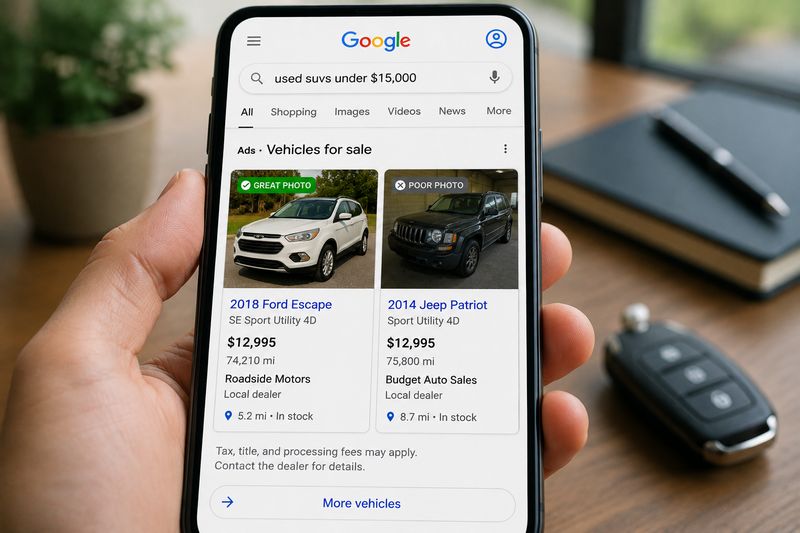
Good vehicle images should:
- Show the actual vehicle when possible
- Be clear and well-lit
- Avoid heavy filters or misleading edits
- Show the exterior from a useful angle
- Match the vehicle listed in the feed
- Avoid watermarks or promotional text if Google policies restrict them
For dealers and auto auctions, images can directly affect ad performance. A clean photo can make even an older affordable vehicle look trustworthy, while poor photos can make shoppers skip the listing.
Price and Financing Information
Price is one of the first things shoppers check when comparing vehicles. Google Vehicle Listing Ads can show the listed price directly in the ad, helping buyers decide whether a vehicle fits their budget before clicking.
This is valuable for budget-conscious shoppers. A person looking for a vehicle under $10,000 does not want to open listings priced at $22,000. Showing the price upfront saves time and improves the quality of website traffic.
Dealers may also include financing-related details when available and allowed by Google’s feed requirements and advertising policies. This can help shoppers understand whether the vehicle may fit their monthly payment goals.
For example, a used sedan listed at $12,900 may attract a shopper who has been comparing compact cars for weeks. If the price is clearly shown, the shopper can quickly decide whether to open the listing, compare mileage, and check availability.
For dealerships, accurate pricing is critical. If the ad shows one price but the vehicle detail page shows another, shoppers may lose trust. Pricing mismatches can also create Merchant Center errors or policy issues.
Vehicle Condition and Mileage
Condition and mileage are key decision factors in used vehicle shopping. Google Vehicle Listing Ads can display information that helps shoppers understand whether a car is new, used, certified pre-owned, or otherwise classified in the dealer’s inventory.
Mileage matters because many buyers use it as a quick way to judge value. A vehicle with 38,000 miles may attract different shoppers than the same model with 145,000 miles.
For example, someone searching for a low-cost commuter car may be willing to consider an older Toyota Corolla if the mileage is reasonable and the price is right. Another shopper may prefer a newer vehicle with fewer miles, even if the price is higher.
For auto auctions, condition details can be especially important. Buyers want to understand whether a vehicle is clean title, salvage, damaged, repairable, or sold as-is. While Google feed rules and ad formats may limit how much condition detail appears directly in the ad, the landing page should clearly explain the vehicle’s actual status.
Accurate condition and mileage information helps avoid low-quality leads. If a shopper clicks expecting a clean retail vehicle but lands on a damaged auction vehicle, they may leave immediately. Clear data helps match the right buyer with the right vehicle.
Dealer Information and Location
Google Vehicle Listing Ads can include dealership or seller information, helping shoppers understand where the vehicle is located and who is offering it.
This may include:
- Dealer name
- City or region
- Distance from the shopper
- Business location
- Vehicle pickup or availability area
Location is important because many vehicle searches have local intent. A shopper searching for “used Honda Civic near me” usually wants options within a reasonable distance.
For example, a buyer in Atlanta may prefer a dealer within 30 miles if they want to test drive the car. But an online auction buyer may be open to vehicles in another state if the price is low enough and shipping makes sense.
For BidNDrive-style auction shoppers, location can affect total cost. A vehicle with a low auction price may still need transportation. Buyers should compare the vehicle price, auction fees, and shipping before deciding whether the deal is truly worth it.
For dealers, accurate location data helps Google show inventory to shoppers in the right market. It also helps prevent wasted clicks from users who are unlikely to buy because the vehicle is too far away.
Vehicle Details and Specifications
Vehicle Listing Ads rely on structured data from the inventory feed. This allows Google to show details that matter to shoppers and match vehicles to specific searches.
Important vehicle details may include:
- Year
- Make
- Model
- Trim
- VIN
- Body style
- Fuel type
- Transmission
- Exterior color
- Interior color
- Drivetrain
- Engine type
- Vehicle condition
- Availability
These specifications help Google understand the inventory and match it to user searches.
For example, if someone searches for “2021 Toyota RAV4 AWD,” Google needs accurate year, make, model, and drivetrain data to show the most relevant vehicles.
For dealerships, missing or incorrect specifications can limit ad performance. A vehicle with incomplete data may appear in fewer searches or may attract the wrong shoppers.
For buyers, detailed specifications reduce confusion. A shopper can quickly tell whether a listing is close to what they want before clicking to the website.
Real-Time Inventory Updates
One of the biggest strengths of Google Vehicle Listing Ads is the ability to update inventory automatically. Since the ads are built from a feed, Google can reflect changes when the dealer updates vehicle data.
This is important because vehicle inventory changes quickly. Cars are sold, prices change, mileage updates, and new vehicles arrive.
For example, a dealer may lower the price of a used Ford Escape from $17,500 to $16,900. Once the feed updates and Google processes the change, the ad can display the new price.
The same applies when a car sells. If the feed is updated quickly, Google can stop showing that vehicle, helping avoid wasted clicks and unhappy shoppers.
For auto auctions, real-time or frequent updates are even more important because auction inventory can move fast. A vehicle may be available for bidding today and gone tomorrow. Feed accuracy helps prevent users from clicking on listings that are no longer open.
Real-time updates also help dealers promote fresh inventory quickly. If a budget-friendly vehicle is added to stock, it can start appearing in relevant searches soon after the feed is processed.
Click-to-Website Functionality
Google Vehicle Listing Ads are designed to send shoppers directly to the vehicle detail page on the dealer’s website or marketplace page. This is different from sending users to a general homepage or broad inventory page.
A strong landing page should include:
- Full vehicle photos
- Price
- Mileage
- Condition
- VIN
- Vehicle history details when available
- Financing options, if offered
- Contact form
- Phone number
- Availability status
- Similar vehicles
For example, if a shopper clicks on a 2020 Honda Accord ad, they should land on the page for that exact 2020 Honda Accord—not a general used car inventory page. This creates a smoother experience and increases the chance of a lead.
For budget-conscious buyers, direct landing pages make comparison easier. They can check the full details, estimate total cost, and decide whether to contact the seller.
Benefits of Google Vehicle Listing Ads
Google Vehicle Listing Ads can help dealers, auto auctions, and online marketplaces connect with shoppers at the exact moment they are searching for a vehicle. Instead of showing a general ad about a dealership, this format shows real inventory with photos, prices, mileage, and location details. That makes the shopping process easier for buyers and more efficient for sellers.
Increased Inventory Visibility
One of the biggest benefits of Google Vehicle Listing Ads is increased inventory visibility. Vehicles can appear directly in Google search results when shoppers search for specific makes, models, body styles, or price ranges.
For a dealership, this means more people can see available inventory without first visiting the dealer’s website. A shopper may not know the dealership name, but they may still discover a vehicle because it matches their search.
For example, a small independent dealer may have a used 2018 Honda Civic priced under $15,000. Without Vehicle Listing Ads, that car may only be visible to people who visit the dealer’s website or third-party marketplace listings. With Vehicle Listing Ads, the same car can appear when a local shopper searches for “used Honda Civic under 15000.”
This is especially helpful for affordable vehicles. Budget-conscious shoppers often search by price first. If the inventory feed includes accurate pricing, Google can match those vehicles with users who are actively looking for lower-cost options.
For auto auctions and platforms like BidNDrive, better visibility can also help expose auction vehicles to buyers who may not have started their search on an auction site.
Higher-Quality Leads
Vehicle Listing Ads can generate higher-quality leads because shoppers see important details before they click. They usually know the vehicle’s price, image, mileage, and basic information before visiting the website.
This helps reduce unqualified traffic. A shopper who clicks on a vehicle after seeing the price is more likely to be interested than someone who clicks a broad ad that only says “Used Cars for Sale.”
For example, if a buyer clicks on a 2021 Toyota Corolla listed at $17,900 with 42,000 miles, that person already has some interest in the vehicle. They are not just browsing a general dealership page. They are looking at a specific car.
For dealers, this can improve lead quality because website visitors arrive with clearer intent. They may be more likely to submit a form, call, schedule a visit, or ask about financing.
For auto auction companies, the same idea applies. A shopper who clicks on a specific auction vehicle is closer to registering, checking fees, estimating shipping, or placing a bid than someone who lands on a general homepage.
Better Search Intent Targeting
Search intent means what the shopper is trying to do when they type a query into Google. Vehicle Listing Ads are powerful because they match ads to users who are actively searching for vehicles.
A user searching for “used Ford F-150 near me” is showing stronger buying intent than someone searching for “best trucks.” The first shopper is likely comparing inventory. The second may still be researching.
Vehicle Listing Ads can target shoppers based on searches involving:
- Make
- Model
- Year
- Body style
- Price range
- Condition
- Mileage
- Location
For example, a shopper searching for “used Toyota Camry under $20,000” is giving Google very clear information. If a dealer has matching inventory, the ad can show that exact type of vehicle.
This benefits buyers because they see more relevant results. It benefits dealers because the ad budget is spent on users who are closer to making a purchase decision.
For budget-focused buyers, better intent targeting makes the process faster. They do not need to sort through luxury vehicles or overpriced listings if their search is focused on affordable options.
Improved Click-Through Rates
Vehicle Listing Ads often attract attention because they are visual. A photo, price, mileage, and model name can be more compelling than a text-only ad.
A shopper comparing vehicles in search results may be more likely to click a listing that shows a clear photo and a fair price. The ad feels closer to a shopping result than a traditional advertisement.
For example, a text ad might say “Used SUVs Available Today.” A Vehicle Listing Ad can show a specific 2020 Nissan Rogue with price, mileage, and image. The second option gives the shopper more confidence before clicking.
Improved click-through rates can help dealers bring more qualified visitors to vehicle detail pages. These are pages where shoppers can view full photos, check features, compare pricing, and submit leads.
However, clicks only matter if the landing page is strong. If the ad shows a vehicle but the click leads to a confusing page, slow website, or unavailable inventory, performance can drop quickly.
Greater Local Market Exposure
Many vehicle searches are local. Shoppers often want to know what is available near them, even if they start their search online.
Google Vehicle Listing Ads can help dealers appear in local searches when inventory matches the shopper’s needs. This is useful for dealerships that compete with larger stores or national platforms.
For example, a buyer in Charlotte may search for “used Mazda CX-5 near me.” A smaller dealer with a well-priced CX-5 can appear alongside larger competitors if the feed data and campaign setup are strong.
Local exposure can help dealers attract shoppers who are ready to visit, call, or request more details. It can also help move vehicles that fit local demand, such as trucks in rural markets, compact cars in urban areas, or family SUVs in suburban areas.
For online auctions, local exposure works a little differently. A buyer may be willing to purchase outside their city if the price is low enough. In that case, ads can help introduce them to auction inventory and encourage them to compare total cost, including fees and transportation.
Lower Cost per Lead Opportunities
Vehicle Listing Ads may help reduce cost per lead when campaigns are managed well. Because ads are tied to real inventory and strong search intent, clicks can be more qualified than traffic from broad campaigns.
A lower cost per lead does not happen automatically. It depends on feed quality, pricing, vehicle selection, campaign budget, landing pages, and conversion tracking.
Dealers can improve cost efficiency by promoting vehicles that are likely to generate demand, such as:
- Affordable used cars
- Popular trucks
- Fuel-efficient sedans
- Family SUVs
- Vehicles with competitive mileage
- Cars priced below local market averages
- Older inventory that needs more exposure
For example, a dealer may spend too much on broad keywords like “used cars.” Vehicle Listing Ads can help shift some budget toward specific inventory that shoppers are already searching for.
For a small dealer, this matters because every advertising dollar counts. A campaign that brings fewer but stronger leads may be better than a campaign that brings many casual visitors who never contact the store.
Enhanced Shopping Experience
Vehicle Listing Ads improve the shopping experience by giving buyers useful information early in the search process. Instead of clicking several websites just to compare prices, shoppers can see vehicle images, prices, mileage, and locations directly in Google.
This is helpful for people with limited budgets. They can quickly ignore vehicles that are too expensive and focus on listings that match their financial situation.
For example, a buyer looking for a reliable commuter car under $12,000 can compare several options in seconds. They can review which vehicles are nearby, which have lower mileage, and which listings look worth opening.
A better shopping experience also benefits dealers. When shoppers find clear and accurate information, they are more likely to trust the listing and continue to the website.
For BidNDrive-style buyers, this type of comparison can be especially useful. A shopper may compare retail dealership prices with auction opportunities and realize that online auctions may offer a lower entry price. When the buyer understands the full cost, including fees and transportation, they can make a smarter purchase decision.
Know the Real Cost Before You Place a Bid
The winning bid is only part of the total purchase price. Before bidding, estimate auction fees, transportation, and shipping costs to understand the full investment. BidNDrive provides the tools you need to make informed buying decisions.
- ✅ Estimate auction fees before bidding
- ✅ Calculate transportation and shipping costs
- ✅ Compare auction savings with retail prices
- ✅ Make smarter buying decisions with full cost visibility
Who Should Use Google Vehicle Listing Ads
Google Vehicle Listing Ads can be useful for many automotive businesses that sell vehicles online. The format works best for companies with real inventory, accurate vehicle data, clear pricing, and a website where shoppers can view full vehicle details. Whether the seller is a franchise dealership, a small used car lot, or an online auto auction platform, Vehicle Listing Ads can help put inventory in front of shoppers who are already searching for cars.
New Car Dealerships
New car dealerships can use Google Vehicle Listing Ads to promote current inventory directly in search results. This is useful because new vehicle shoppers often compare specific models, trims, prices, and local availability before visiting a dealership.
For example, a shopper may search for “2026 Toyota Camry near me” or “new Ford F-150 XLT in Atlanta.” If a dealership has matching inventory, Vehicle Listing Ads can show the vehicle with a photo, price, and location details.
New car dealers can use these ads to promote:
- Popular models
- New arrivals
- Vehicles with manufacturer incentives
- High-demand trims
- Vehicles available for immediate delivery
- Slow-moving inventory
For buyers, this makes the search process easier. Instead of calling several dealerships to ask what is available, they can compare vehicles in Google results before choosing which dealer to contact.
For dealerships, this can reduce wasted clicks because shoppers see the actual vehicle before visiting the website.
Used Car Dealerships
Used car dealerships are one of the strongest fits for Google Vehicle Listing Ads. Used car shoppers often care about price, mileage, condition, location, and photos. Vehicle Listing Ads show many of these details before the shopper clicks.
For example, a buyer with a $12,000 budget may search for “used Honda Civic under 12000” or “used SUV under 15000 near me.” If a dealer has matching vehicles, the ads can help those cars appear in front of serious shoppers.
Used car dealers can benefit by promoting:
- Affordable inventory
- Low-mileage vehicles
- Fuel-efficient cars
- Family SUVs
- Pickup trucks
- Older inventory that needs more exposure
- Vehicles priced below local competitors
This is especially helpful for dealerships that sell budget-friendly vehicles. Many shoppers are not looking for the newest car. They want reliable transportation at a price they can afford.
A clear Vehicle Listing Ad can help them find that option faster.
Independent Dealers
Independent dealers often compete with larger franchise stores and national car-buying platforms. Google Vehicle Listing Ads can help smaller dealers increase visibility without needing the same brand recognition as a large dealer group.
A small dealer may not have a famous name, but they may have a well-priced vehicle that matches a shopper’s search. Vehicle Listing Ads allow that specific vehicle to compete in search results.
For example, an independent dealer with 35 vehicles may have a clean 2019 Nissan Altima priced under market value. A shopper searching for that model may see the listing even if they have never heard of the dealership before.
Independent dealers should use Vehicle Listing Ads when they have:
- Accurate inventory data
- Strong vehicle photos
- Competitive pricing
- A clean website experience
- Fast lead response
- Updated availability
For budget-conscious shoppers, independent dealers can be attractive because they sometimes offer lower prices than large franchise stores. Vehicle Listing Ads help bring those options into the shopper’s comparison process.
Auto Auction Companies
Auto auction companies can also benefit from Google Vehicle Listing Ads when they have eligible inventory, accurate feed data, and landing pages that clearly explain how the buying process works.
Auction shoppers often search for lower prices, repairable vehicles, salvage vehicles, clean title cars, fleet vehicles, repossessions, and wholesale opportunities. Vehicle Listing Ads can help introduce these buyers to auction inventory earlier in the search process.
For example, a shopper searching for “used Ford Explorer under 10000” may be comparing retail dealership prices. If an auction platform shows a relevant vehicle with a lower starting bid or auction price, the shopper may decide to learn more about bidding.
For a company like BidNDrive, Vehicle Listing Ads can support goals such as:
- Promoting auction inventory
- Driving vehicle detail page visits
- Increasing user registrations
- Attracting budget-focused buyers
- Showing buyers alternatives to retail pricing
- Helping shoppers discover online auctions
Auction platforms should be especially clear on landing pages. Buyers need to understand the vehicle condition, title type, fees, bidding process, deposit rules, and transportation options before placing a bid.
Online Car Marketplaces
Online car marketplaces can use Vehicle Listing Ads to promote large amounts of inventory from many sellers. These platforms often serve shoppers who want to compare vehicles across brands, locations, prices, and conditions.
A marketplace may include:
- Dealer listings
- Private seller listings
- Auction listings
- Certified vehicles
- Used cars
- Commercial vehicles
- Specialty inventory
Vehicle Listing Ads can help marketplaces send shoppers directly to relevant vehicle pages instead of broad search pages.
For example, a buyer searching for “used Ram 1500 under 25000” may click a marketplace listing that leads to a page with that exact truck. From there, the shopper may compare similar vehicles on the same platform.
For buyers, marketplaces are useful because they create more choice. For sellers, they create another channel for exposure. For Google, accurate inventory data helps match shoppers with the most relevant listings.
Automotive Groups and Dealer Networks
Automotive groups and dealer networks can use Google Vehicle Listing Ads to promote inventory across multiple locations. This is especially useful when one group owns several dealerships in the same region or across multiple states.
Instead of advertising each location separately with only text ads, a dealer group can promote real inventory from all stores.
For example, a dealership group may have Toyota, Ford, Chevrolet, and used car locations. A shopper searching for “used Toyota Highlander near me” may see inventory from the group’s Toyota store or used car center, depending on availability and location.
Dealer groups can use Vehicle Listing Ads to:
- Increase visibility across locations
- Move inventory between markets
- Promote used inventory group-wide
- Support local dealership websites
- Improve lead routing
- Compare performance by store
- Identify which vehicles attract the most demand
Good data management is critical for dealer networks. Each vehicle must point to the correct location, price, landing page, and availability status. If inventory data is wrong, shoppers may contact the wrong store or find that the vehicle is no longer available.
Buy-Here-Pay-Here Dealerships
Buy-here-pay-here dealerships can use Google Vehicle Listing Ads to reach shoppers who need affordable vehicles and flexible financing options. These buyers may have limited credit, lower cash reserves, or difficulty getting approved by traditional lenders.
Vehicle Listing Ads can help these dealerships promote inventory that fits real buyer needs.
For example, a shopper may search for “used cars under 10000 near me” or “cheap used cars with financing.” A buy-here-pay-here dealer with matching inventory can show available vehicles directly in Google results.
These dealerships should focus on clear and honest listings. Buyers need to understand the price, mileage, vehicle condition, down payment expectations, and financing process.
Useful inventory for buy-here-pay-here ads may include:
- Affordable sedans
- Older SUVs
- Economy cars
- Lower-priced minivans
- Basic pickup trucks
- Vehicles with manageable monthly payments
For shoppers with tight budgets, transparency is especially important. A low vehicle price may look attractive, but the full cost matters. Clear landing pages should explain financing terms, fees, and vehicle availability.
Eligibility Requirements for Google Vehicle Listing Ads
Google Vehicle Listing Ads are not available to every seller or every type of vehicle. Google requires dealers and automotive advertisers to meet specific rules before inventory can appear in vehicle ads. These rules help protect shoppers from misleading listings, unavailable vehicles, incorrect pricing, and sellers that are not properly verified.
Supported Countries and Markets
Google Vehicle Listing Ads are available only in selected markets. At the time of writing, Google lists vehicle ads as available in the United States, Canada, and Australia, with open beta access in several European markets, including France, Germany, Italy, Spain, the Netherlands, and the United Kingdom. Japan is listed as a closed beta market.
This matters because a dealer cannot simply create a feed and expect ads to run in every country. Availability depends on Google’s current program rules, local market support, and account approval.
For example, a used car dealer in the United States may be able to enable vehicle ads directly in Merchant Center. A dealer in the United Kingdom may need to follow the beta participation process and wait for approval.
Dealers should always check Google’s current availability rules before planning a campaign budget. If the program is not supported in the dealer’s market, the business may need to use traditional Search Ads, Performance Max without vehicle feeds, or other automotive advertising channels.
Dealer Eligibility Requirements
Google Vehicle Listing Ads are mainly designed for legitimate automotive businesses, not private individuals. Google states that vehicle ads can support inventory from dealer or retailer stock, aggregators, and OEMs, but private sellers, individuals, and auto brokers are not permitted.
Dealers may need to prove that they are allowed to sell vehicles in their market. Google’s vehicle ads policies say dealerships must have a valid dealership license where required by local law. Examples may include a state dealer license, sales license, permit information, or business registration. A driver’s license or sales receipt is not enough.
This helps shoppers trust the listings they see. A buyer with a limited budget may already be nervous about scams, hidden fees, or unavailable cars. Verified dealer eligibility helps reduce that risk.
For auto auction companies and marketplaces, eligibility can be more complex. Aggregators and OEMs may be allowed to upload vehicles from dealerships with valid licenses, but the listings must still follow Google’s rules. Auction-style pricing and vehicle auctions are generally not supported under Google’s vehicle ads policies.
Vehicle Inventory Requirements
Vehicle inventory must meet Google’s vehicle ads rules before it can be promoted. Google’s overview states that vehicle ads support new and used vehicle inventory from eligible dealers, retailer stock, aggregators, or OEMs.
Google’s vehicle ads policies also limit what types of vehicles can be listed. In general, vehicle ads are focused on non-commercial passenger vehicles. Google notes that unsupported vehicle types may include motorcycles, boats, planes, farm vehicles, go-karts, race cars, and vehicles requiring a commercial license.
Inventory data must be accurate and match the vehicle landing page. This includes details such as price, availability, mileage, condition, vehicle title status, image, and location.
For example, if a dealer lists a 2021 Toyota Camry at $18,900 in the feed, the landing page should show the same vehicle and the same price. If the vehicle has already sold or the landing page shows a different price, Google may flag the listing.
Clean title rules are especially important. Google’s policy says vehicles listed for sale must have a clean title, and vehicles with title defects such as salvage or lien titles are ineligible for vehicle ads.
For platforms like BidNDrive, this distinction matters. Online auto auctions may include salvage vehicles, repairable vehicles, or auction pricing models. Those vehicles may be valuable to budget-conscious buyers, but they may not qualify for Google Vehicle Listing Ads under standard vehicle ads rules. In that case, other Google Ads formats may be a better fit.
Website Requirements
The website is a major part of eligibility. Google needs to see that the vehicle in the ad matches the vehicle on the landing page.
A strong vehicle detail page should include:
- Vehicle year, make, model, and trim
- VIN
- Price
- Mileage
- Vehicle condition
- Availability
- Dealer name and location
- Clear vehicle photos
- Contact options
- Any important fees or purchase terms
The landing page should open the exact vehicle shown in the ad, not a general inventory page. If a shopper clicks on a 2020 Honda Accord, they should land on the page for that same 2020 Honda Accord.
This is important for buyers with tight budgets. They do not want to click a low-priced listing and then discover the car is unavailable, more expensive, or completely different.
Google has also increased attention on vehicle ads data quality. In 2026, Google began highlighting vehicle ads data quality issues in Merchant Center, including mismatches between submitted feed data and website content.
Dealers should make sure their website loads quickly, works well on mobile, and clearly shows current inventory. A slow or confusing site can reduce conversions even if the ads are approved.
Merchant Center Requirements
Google Merchant Center is required because it stores and manages the vehicle inventory feed. Dealers must create a Merchant Center account, verify and claim the website, submit business information, and upload a properly formatted vehicle feed.
Google explains that vehicle ads can be enabled through the “Add-on” section in Merchant Center in direct-access markets such as the United States, Canada, and Australia. In beta markets, advertisers may need to meet prerequisites and submit a participation form.
Merchant Center is also where dealers monitor:
- Feed status
- Disapproved vehicles
- Missing attributes
- Pricing errors
- Availability mismatches
- Image problems
- Policy issues
For vehicle listings, Google’s developer documentation says the feed is the central data source Google uses to access and display vehicles. Google currently supports CSV feeds for vehicle listings and recommends starting with a few test vehicles before scaling to full inventory.
For a small dealer, this means setup should be done carefully. It is better to submit clean data for 20 vehicles than messy data for 200 vehicles.
Google Ads Account Requirements
A Google Ads account is required to run paid Vehicle Listing Ads. The Google Ads account must be linked to the Merchant Center account so campaigns can use the approved vehicle feed.
Google says advertisers can activate vehicle ads through Performance Max campaigns with vehicle feeds or Standard Shopping campaigns with vehicle feeds, depending on their goals and level of control.
The Google Ads account should be ready for:
- Campaign setup
- Budget management
- Conversion tracking
- Location targeting
- Bidding strategy selection
- Account linking
- Performance reporting
For example, a dealer may have an approved Merchant Center feed but no conversion tracking. In that case, the campaign may still run, but the dealer may struggle to understand which clicks turn into calls, form submissions, visits, or sales.
For dealerships and auction platforms, conversion tracking is especially important. A click is not the final goal. The real goal may be a lead, phone call, appointment, registration, bid, or sale.
Policy Compliance Requirements
Policy compliance is not a one-time task. Dealers must continue following Google’s Shopping ads policies and vehicle ads policies after campaigns launch.
Common compliance areas include:
- Accurate pricing
- Accurate availability
- Eligible vehicle types
- Clean title requirements
- No unsupported auction pricing
- No private seller listings
- Correct dealer license information
- Matching feed and website data
- Clear landing pages
- High-quality images
- No misleading claims
If the feed says a vehicle is available, the website should also show it as available. If the ad shows one price, the landing page should not surprise the shopper with a different price.
For budget-conscious shoppers, accuracy matters a lot. A person looking for a $9,000 vehicle may not have time to chase listings that turn out to be unavailable or priced differently after fees.
Dealers should check Merchant Center issues regularly and fix warnings quickly. Google may disapprove individual vehicles or restrict account performance if the data does not meet requirements.
Setting Up Google Merchant Center for Vehicle Ads
Google Merchant Center is the main place where a dealer prepares vehicle inventory for Google Vehicle Listing Ads. It connects the dealership website, business information, vehicle feed, and Google Ads account. A clean setup helps Google understand which vehicles are available, where they are located, and which shoppers should see them.
Creating a Merchant Center Account
The first step is to create a Google Merchant Center account for the dealership or automotive business. This account stores inventory data and helps Google review whether vehicles are eligible to appear in ads.
During setup, the dealer usually needs to enter basic business details, such as:
- Business name
- Website URL
- Business address
- Contact information
- Country of operation
- Business type
- Time zone
For example, a small used car dealer with 60 vehicles needs one organized Merchant Center account where Google can review inventory and business information. Without this account, the dealer cannot properly submit vehicle data for Vehicle Listing Ads.
It is important to use accurate business information from the beginning. If the dealership name, website, or address does not match what appears on the website, Google may ask for corrections before approving the account.
Verifying and Claiming Your Website
After creating the account, the dealer must verify and claim the website. This tells Google that the business has permission to use that website in Merchant Center.
Website verification can usually be done through methods such as:
- Adding an HTML tag to the website
- Uploading an HTML file
- Using Google Tag Manager
- Using Google Analytics
- Connecting through an approved website platform
Once the website is verified, the business can claim it inside Merchant Center. Claiming prevents another Merchant Center account from using the same website for product or vehicle listings.
For example, if a dealership website is exampleautos.com, Google needs to confirm that the dealership controls that domain. This helps prevent fake sellers from advertising vehicles on websites they do not own.
For buyers, this matters because it improves trust. A shopper clicking on a vehicle ad should land on a real dealer website, not a copied listing or misleading page.
Configuring Business Information
Business information should be complete and consistent across Merchant Center, the dealership website, Google Business Profile, and Google Ads. Google uses this information to understand who is selling the vehicles and where the inventory is located.
Important business details may include:
- Legal business name
- Dealership name
- Physical address
- Phone number
- Customer service contact
- Website URL
- Business hours
- Dealer license information, if required
- Store locations, if the business has more than one location
For example, a dealer group with three stores should make sure each location is entered correctly. A shopper interested in a specific vehicle should know which store has that vehicle available.
Incorrect business information can create confusion. If the vehicle feed says the car is in Miami but the website shows Orlando, Google may flag the listing or shoppers may contact the wrong location.
For budget-conscious shoppers, location details are especially important. A lower-priced vehicle may still be a bad deal if transportation costs make the total price too high.
Setting Up Automotive Feeds
The automotive feed is the file that sends vehicle inventory to Google. It must include structured data for each vehicle, such as price, mileage, VIN, condition, image, location, and landing page URL.
A vehicle feed may be created through:
- Dealer inventory software
- Dealer management system
- Website provider
- Third-party feed provider
- Custom spreadsheet or CSV file
- API-based inventory connection
Common vehicle feed fields include:
- VIN
- ID
- Year
- Make
- Model
- Trim
- Price
- Mileage
- Condition
- Availability
- Image link
- Vehicle detail page link
- Store code or location
For example, if a dealer has a 2021 Honda CR-V listed for $21,900 with 48,000 miles, the feed should show the same details as the vehicle page on the website.
Accuracy is critical. If the feed says the vehicle is available but the website says it is sold, the ad may create a bad customer experience and lead to disapproval.
Dealers should also update the feed frequently. Used inventory changes fast, and stale data can waste ad budget.
Linking Merchant Center With Google Ads
After Merchant Center is set up and the vehicle feed is working, the dealer needs to link Merchant Center with Google Ads. This connection allows Google Ads campaigns to use the approved vehicle inventory.
The process usually involves sending a link request from Merchant Center or approving a link request from Google Ads. Both accounts must be connected under the correct business.
Once linked, the dealer can create campaigns that use vehicle inventory data.
This connection allows Google Ads to manage:
- Campaign budgets
- Bidding strategies
- Geographic targeting
- Conversion tracking
- Performance reporting
- Vehicle ad delivery
For example, Merchant Center may store the vehicle feed, but Google Ads decides how much the dealer spends, where the ads show, and which searches trigger the ads.
For a small dealer, this connection should be checked carefully. If the wrong Google Ads account is linked, campaigns may not have access to the inventory feed.
For an auto auction platform, the connection between Merchant Center and Google Ads is also important because campaign performance depends on clean inventory data, correct landing pages, and accurate conversion tracking.
Managing Account Access
Merchant Center access should be managed carefully because several people or vendors may work on the account. A dealership may have an owner, marketing manager, website provider, feed provider, and advertising agency involved.
Common access roles may include:
- Admin access
- Standard access
- Email-only access
- Reporting access
- Feed management access
Not everyone needs full admin access. The person managing feed errors may not need billing permissions. An outside agency may need access to troubleshoot campaigns but should not control the entire business account without oversight.
For example, a dealer may hire an agency to set up Vehicle Listing Ads. The agency needs access to Merchant Center and Google Ads, but the dealership should still keep ownership of both accounts.
This protects the business if the agency relationship ends. The dealer should not lose access to inventory feeds, historical campaign data, or account settings.
Good access management also helps prevent accidental changes. One wrong feed setting or account change can stop vehicles from showing.
Creating a Vehicle Inventory Feed
A vehicle inventory feed is the data file that tells Google which vehicles are available and what details should be shown in ads. If the feed is accurate, Google can match vehicles with the right shoppers. If the feed is incomplete or outdated, ads may perform poorly or vehicles may be disapproved.
Required Feed Attributes
Required feed attributes are the fields Google needs to identify, understand, and display each vehicle correctly. Without these fields, the vehicle may not be eligible to appear in Vehicle Listing Ads.
Common required attributes usually include:
- Vehicle ID
- VIN
- Year
- Make
- Model
- Price
- Availability
- Mileage
- Condition
- Image link
- Landing page URL
- Dealer name or store information
- Vehicle location
For example, if a dealer wants to advertise a 2021 Honda Accord, the feed must clearly tell Google what the vehicle is, where it is located, how much it costs, whether it is available, and which page the shopper should visit after clicking.
For budget-conscious shoppers, this matters because missing or incorrect data can create frustration. A buyer may click on a vehicle expecting one price, only to find different information on the website. That hurts trust and wastes ad spend.
Recommended Feed Attributes
Recommended attributes are not always required, but they can help improve ad quality and search matching. The more useful information a dealer provides, the easier it is for Google to understand the vehicle and show it to the right shopper.
Recommended attributes may include:
- Trim
- Body style
- Exterior color
- Interior color
- Fuel type
- Transmission
- Drivetrain
- Engine details
- Certified pre-owned status
- Additional image links
- Sale price
- Financing details
- Vehicle description
For example, “2022 Toyota RAV4 LE AWD” is more helpful than simply “2022 Toyota RAV4.” A shopper searching for an all-wheel-drive SUV may be more likely to see a relevant listing if drivetrain data is included.
Recommended fields are especially useful for used car dealers and auction platforms because shoppers often compare vehicles by details beyond year, make, and model. Mileage, trim, title status, photos, and condition can all influence whether a buyer clicks.
Vehicle Identification Numbers
The VIN is one of the most important parts of a vehicle feed. It helps Google identify the exact vehicle being advertised and match it with the correct listing page.
A VIN should be:
- Complete
- Accurate
- Unique to one vehicle
- Matched to the correct landing page
- Updated if inventory changes
Dealers should avoid using fake VINs, partial VINs, repeated VINs, or placeholder values. If several listings use the same VIN, Google may flag the feed because it cannot confirm which vehicle is real.
For example, if a dealer has two 2020 Ford Explorers in stock, each one must have its own VIN and its own vehicle data. Even if they are the same color and price, they are still separate vehicles.
For buyers, the VIN is also useful because it allows them to check vehicle history, title details, recalls, and specifications. On platforms like BidNDrive, shoppers often use the VIN to research auction vehicles before bidding.
Price and Availability Fields
Price and availability fields must be accurate because they directly affect shopper trust and campaign performance. If a vehicle is listed at one price in the ad but another price on the website, the listing may be disapproved or lead to poor user experience.
Important pricing fields may include:
- Current price
- Sale price, if applicable
- Currency
- Availability status
- Vehicle detail page URL
- Any important pricing conditions
Availability should clearly show whether the vehicle is currently for sale, sold, reserved, pending, or unavailable.
For example, a dealer may advertise a 2019 Nissan Altima for $14,500. If the vehicle sells, the feed should update quickly so Google stops showing the ad. If the ad continues running after the car is sold, shoppers may click, call, and become frustrated.
Auction platforms need to be extra careful with pricing. A starting bid, current bid, estimated retail value, and buy-now price are not the same thing. If Vehicle Listing Ads are used, the price shown should match Google’s rules and the landing page clearly.
Mileage and Condition Information
Mileage and condition are major decision factors for vehicle shoppers. A buyer looking for a reliable commuter car may compare two similar sedans mostly by price and mileage.
Mileage should be entered accurately and consistently. If the vehicle has 64,250 miles, the feed and website should show the same number or a very close updated figure.
Condition information may include whether the vehicle is:
- New
- Used
- Certified pre-owned
- Damaged
- Repairable
- Sold as-is
- Clean title
- Salvage title, if applicable on the site
For Google Vehicle Listing Ads, dealers must follow eligibility rules for vehicle condition and title status. Not every auction vehicle or damaged vehicle will qualify for this format.
For example, a clean used 2020 Toyota Corolla may be eligible if all data is accurate. A salvage vehicle with frame damage may be useful for a budget buyer on BidNDrive, but it may need a different advertising strategy if it does not meet Google Vehicle Listing Ads requirements.
Clear condition data protects both the seller and the shopper. Buyers do not want surprises, especially when working with a limited budget.
Vehicle Images and Media Requirements
Vehicle photos strongly affect ad performance. Since Vehicle Listing Ads are visual, poor images can reduce clicks even when the price is good.
Good vehicle images should:
- Show the actual vehicle
- Be clear and bright
- Avoid heavy filters
- Avoid misleading angles
- Match the listed vehicle
- Show the exterior clearly
- Use a clean background when possible
- Avoid excessive text or promotional overlays
Dealers should include at least one strong main image and, when possible, several additional photos.
Useful photo angles may include:
- Front exterior
- Rear exterior
- Side view
- Interior dashboard
- Seats
- Odometer
- Wheels
- Cargo area
- Damage areas, if applicable
For example, a buyer comparing two used SUVs under $18,000 may click the listing with better photos first. Clear images make the vehicle feel more trustworthy.
For auto auctions, photos are even more important because buyers may not inspect the vehicle in person. If a vehicle has visible damage, the landing page should show it honestly. This helps buyers estimate repair costs before bidding.
Inventory Feed Formatting
The feed must be formatted in a way Google can read. Many dealers use inventory software, website providers, dealer management systems, or third-party feed providers to generate the file automatically.
Common feed formats may include:
- CSV files
- XML feeds
- API-based feeds
- Scheduled file uploads
- Feed provider integrations
Good formatting means every field is placed correctly and uses accepted values. For example, the price field should contain the correct currency and amount. The mileage field should contain a number, not a sentence. The image link should open a real image, not a broken URL.
Common feed formatting mistakes include:
- Missing required fields
- Incorrect column names
- Broken image links
- Invalid VINs
- Wrong price format
- Duplicate vehicle IDs
- Sold vehicles left in the feed
- Landing pages that do not match the vehicle
- Mileage entered in the wrong format
A small dealer should test the feed with a limited number of vehicles before uploading the full inventory. This makes it easier to fix errors early.
Required and Optional Vehicle Feed Attributes
Vehicle feed attributes are the data points that describe each vehicle in Google Merchant Center. Some fields are required because Google needs them to identify and display the vehicle. Other fields are optional, but they can improve ad quality, help shoppers compare listings, and increase the chance that the right buyer clicks.
Required Vehicle Fields
Required vehicle fields are the basic data elements Google needs before a vehicle can be reviewed for ads. If these fields are missing, incorrect, or formatted poorly, the vehicle may be disapproved or may not show correctly.
Common required vehicle fields include:
- Unique vehicle ID
- VIN
- Year
- Make
- Model
- Price
- Availability
- Mileage
- Condition
- Image link
- Vehicle detail page URL
- Store or dealer information
- Location information
For example, a dealer listing a 2020 Toyota Camry must clearly provide the VIN, price, mileage, condition, image, and landing page for that exact vehicle. If the feed sends users to a general inventory page instead of the Camry page, the listing may perform poorly or create data issues.
For budget-conscious shoppers, these required fields are not just technical details. They help buyers quickly answer basic questions: What is the car? How much does it cost? How many miles does it have? Is it still available? Where is it located?
Recommended Data Fields
Recommended fields are not always mandatory, but they make the vehicle listing stronger. They help Google better understand the inventory and help shoppers make faster decisions.
Recommended data fields may include:
- Trim
- Body style
- Exterior color
- Interior color
- Transmission
- Drivetrain
- Fuel type
- Engine details
- Certified pre-owned status
- Additional image links
- Vehicle options
- Sale price
- Financing information
- Vehicle description
For example, “2021 Ford Explorer XLT AWD” is much more useful than “2021 Ford Explorer.” A shopper looking for an all-wheel-drive SUV may skip a listing if drivetrain is missing.
Recommended fields can also help dealers compete on details, not only price. A vehicle with heated seats, low mileage, clean history, and strong photos may attract more qualified clicks than a similar listing with limited information.
Vehicle Descriptions
A vehicle description gives shoppers more context than basic feed fields alone. It can explain the vehicle’s strongest features, condition, use case, and value.
A good vehicle description should be clear, factual, and easy to scan. It should not exaggerate or hide important details.
A useful description may include:
- Main features
- Trim highlights
- Fuel economy benefits
- Interior condition
- Ownership or service notes, if available
- Safety features
- Technology features
- Practical use cases
For example:
“2020 Honda Civic LX with automatic transmission, backup camera, Bluetooth, cloth seats, and 72,000 miles. A practical sedan for commuting, students, or first-time buyers looking for affordable transportation.”
This type of description speaks directly to shoppers who care about value. It does not use empty phrases like “must see” or “best deal ever.” It explains why the car may fit the buyer’s needs.
For auction vehicles, descriptions should be even more careful. If the vehicle is sold as-is, has visible damage, or needs repairs, the landing page should make that clear. Shoppers trying to save money still need honest information before they decide to bid.
Dealer Information Fields
Dealer information fields help Google connect the vehicle to the correct seller and location. This is especially important for local searches, multi-location dealer groups, and marketplaces with many sellers.
Dealer fields may include:
- Dealer name
- Store code
- Business address
- Phone number
- Website URL
- Location ID
- City
- State
- ZIP code
- Country
For example, a dealer group may have one Chevrolet store, one used car center, and one budget lot. Each vehicle should be tied to the correct location. If a shopper clicks on a vehicle listed at the budget lot, they should not be sent to the wrong store.
Dealer information also affects trust. Buyers want to know who is selling the vehicle and where it can be seen or picked up.
For BidNDrive-style online auction buyers, location details are just as important. A vehicle may have a low auction price, but if it is far from the buyer, transportation costs must be included in the total budget.
Financing and Pricing Details
Pricing information must be accurate and consistent between the feed and the landing page. Shoppers notice price differences immediately, and Google may flag mismatched pricing.
Pricing fields may include:
- Listed price
- Sale price
- Currency
- Availability
- Financing terms, if used
- Down payment details, if applicable
- Monthly payment estimate, if allowed and accurate
- Dealer fees or required charges, where applicable
For example, a buyer may search for a used SUV under $15,000. If the ad shows $14,800 but the landing page shows $16,500 after required fees, the shopper may lose trust.
Financing details should also be handled carefully. If a dealer shows a monthly payment estimate, the landing page should explain the assumptions behind it, such as down payment, loan term, credit approval, taxes, and fees.
For buy-here-pay-here dealers or budget-focused used car dealers, transparent pricing is critical. Many buyers are already worried about hidden costs. Clear feed data helps attract more serious and confident shoppers.
Optional Merchandising Elements
Optional merchandising elements help make listings more attractive when they are accurate and policy-compliant. These details can highlight why a vehicle is worth clicking.
Optional merchandising elements may include:
- Special offer labels
- Price drop notes
- Additional photos
- Certified pre-owned badges
- Low-mileage highlights
- One-owner notes, if verified
- Warranty information
- Vehicle history report links
- Delivery or shipping availability
- Similar vehicle recommendations on the landing page
For example, a dealer may want to highlight a “price reduced” vehicle or a low-mileage compact sedan that is ideal for commuting. These details can help shoppers understand value quickly.
However, merchandising should never be misleading. A dealer should not call a vehicle “like new” if it has obvious wear, damage, or a branded title. A low price should not hide mandatory fees.
For auto auction platforms, merchandising can focus on practical buyer needs: bidding access, vehicle history, estimated fees, shipping support, and clear condition details. A shopper using BidNDrive may be looking for savings, but they still need enough information to compare the auction opportunity with retail dealer prices.
Vehicle Feed Optimization Best Practices
A vehicle feed should not only meet Google’s basic requirements. It should also help shoppers understand each vehicle quickly and trust the listing before they click. Good feed optimization can improve visibility, reduce wasted ad spend, and bring better-qualified buyers to vehicle detail pages.
Writing Effective Vehicle Titles
Vehicle titles should be clear, specific, and easy to understand. A good title tells the shopper exactly what the vehicle is without stuffing in unnecessary keywords.
A strong vehicle title may include:
- Year
- Make
- Model
- Trim
- Body style
- Drivetrain, if important
- Key package or feature, if useful
For example, “2021 Toyota RAV4 LE AWD” is much better than “Used Toyota SUV for Sale.” The first title gives Google and the shopper clear information. The second title is too broad and does not help the buyer compare options.
Good titles are especially important for shoppers searching by budget and model. A person looking for an affordable used SUV may scan several listings in seconds. If the title is vague, they may skip it.
Dealers should avoid titles that include misleading claims, excessive punctuation, or promotional phrases such as “Best Deal!!!” or “Won’t Last Long.” The title should describe the vehicle, not pressure the shopper.
For auction-style inventory, the title should still be simple and factual. A BidNDrive shopper may want to know whether the listing is a Ford F-150, Chevrolet Silverado, Honda Civic, or Toyota Camry before checking auction details, title type, fees, and condition.
Optimizing Vehicle Descriptions
Vehicle descriptions should help the shopper understand why the vehicle may fit their needs. A good description is short, useful, and honest.
It can mention:
- Main features
- Mileage
- Interior condition
- Fuel economy benefits
- Safety features
- Technology
- Practical use
- Service history, if known
- Title or condition notes, when relevant on the landing page
For example:
“2020 Honda Accord LX with automatic transmission, backup camera, Bluetooth, cloth interior, and 68,000 miles. A practical sedan for commuting, students, or first-time buyers looking for dependable transportation.”
This description works because it gives real information. It does not rely on empty phrases like “amazing car” or “priced to sell.”
Descriptions should also match the landing page. If the vehicle has damage, high mileage, or is sold as-is, the website should explain that clearly. Budget-conscious buyers are often willing to consider older or imperfect vehicles, but they need honest details to estimate the real cost.
For dealerships, clear descriptions can reduce low-quality leads. For auction platforms, they can help buyers understand whether a vehicle is worth bidding on before they register or place a deposit.
Using High-Quality Images
Images can strongly affect whether a shopper clicks a Vehicle Listing Ad. Since the ad format is visual, a poor image can make even a well-priced car look less trustworthy.
High-quality images should:
- Show the actual vehicle
- Be bright and clear
- Avoid blur
- Avoid heavy filters
- Show the exterior clearly
- Match the correct VIN
- Avoid misleading edits
- Show important damage on the landing page when applicable
A strong main image usually shows the vehicle from the front three-quarter angle. This lets shoppers see the front, side, color, body shape, wheels, and general condition at once.
For example, if two used Nissan Rogues are priced under $17,000, the listing with a clean, bright photo may get more clicks than the listing with a dark lot photo or a cropped image.
Additional images are also important on the landing page. Shoppers may want to see the interior, dashboard, odometer, tires, cargo area, and any visible damage.
For BidNDrive-style auction buyers, photos are even more important because many shoppers buy online without seeing the vehicle in person. Clear photos help buyers estimate repair costs, compare auction opportunities, and avoid surprises.
Keeping Prices Accurate
Price accuracy is one of the most important feed optimization rules. The price in the feed should match the price on the vehicle detail page.
If the ad shows one price and the landing page shows another, shoppers may lose trust immediately. Google may also flag the listing for a data mismatch.
Accurate pricing includes:
- Current listed price
- Sale price, if applicable
- Currency
- Required fees, where applicable
- Clear financing terms, if monthly payments are shown
- Consistency between feed and website
For example, a buyer searching for “used car under $10,000” may click a listing that shows $9,800. If the landing page shows a much higher price or unclear fees, the buyer may leave and avoid that dealer in the future.
Dealers should review pricing before feed submission and update the feed whenever prices change. This is especially important during promotions, month-end price adjustments, and inventory aging campaigns.
Auction platforms must be careful with price wording. A starting bid, current bid, Buy It Now price, and estimated retail value are different. The landing page should make the pricing model clear so shoppers understand what they are seeing.
Updating Sold Inventory Quickly
Few things frustrate shoppers more than clicking on a vehicle that has already been sold. Sold inventory wastes ad spend and damages trust.
Vehicle feeds should update quickly when a car is:
- Sold
- Reserved
- Pending sale
- Removed from inventory
- Sent to wholesale
- No longer available for retail sale
For example, a dealer sells a used Honda CR-V on Saturday morning. If the feed does not update until Monday, shoppers may keep clicking the ad all weekend. Those clicks cost money and may create unhappy leads.
The best setup is automatic inventory synchronization between the dealer’s inventory system, website, Merchant Center, and Google Ads. Smaller dealers that update manually should create a daily routine to remove sold vehicles and check feed errors.
For auto auctions, quick updates are even more important. Auction inventory can change fast, and some vehicles may only be available for a short bidding window. If a listing remains active after the auction ends, buyers may feel misled.
A clean feed helps bring shoppers to vehicles they can actually buy or bid on.
Improving Data Quality Scores
Data quality affects how well Google understands and approves inventory. Better data can improve ad eligibility, matching, user experience, and campaign efficiency.
Dealers can improve feed quality by checking:
- Missing required fields
- Invalid VINs
- Duplicate vehicle IDs
- Broken image links
- Incorrect prices
- Mismatched landing pages
- Wrong availability status
- Missing mileage
- Poor image quality
- Incomplete dealer location data
- Unsupported vehicle types
- Policy issues
Merchant Center can show warnings and errors that help dealers find problems. These issues should be reviewed regularly, not only during the first setup.
For example, a dealer may discover that several vehicles are missing trim information or have broken image links. Fixing those issues can make the listings more useful to shoppers and easier for Google to match with relevant searches.
Improving data quality is especially important for small dealers with limited ad budgets. Every wasted click matters. Clean data helps ads reach people who are more likely to contact the dealer, schedule a visit, register, or make a purchase decision.
Connecting Google Ads to Vehicle Inventory
After the vehicle feed is ready in Google Merchant Center, the next step is connecting that inventory to Google Ads. This connection allows Google to use real vehicle data in campaigns instead of relying only on text ads. For dealers, this means ads can promote specific cars, trucks, and SUVs that shoppers are already searching for.
Creating Vehicle Listing Campaigns
Vehicle Listing campaigns use inventory data from Merchant Center to show individual vehicles in Google search results. Instead of writing a separate ad for every vehicle, the campaign pulls details from the feed, such as the image, price, year, make, model, mileage, and landing page.
This saves time for dealers with changing inventory. A used car dealership may have 80 vehicles today, 75 tomorrow, and 90 next week. If the feed is updated correctly, Google can adjust which vehicles are eligible to show without the dealer manually creating new ads every day.
For example, if a dealer adds a 2021 Toyota Corolla priced under $18,000, that vehicle can become part of the campaign after the feed is processed. If a shopper searches for “used Toyota Corolla near me,” Google may match that vehicle to the search.
For auto auction companies, the same idea can help promote eligible inventory when the vehicle data, pricing format, and landing pages meet Google’s requirements.
Campaign Setup Process
The campaign setup process starts inside Google Ads after Merchant Center is linked. The dealer chooses a campaign type that can use vehicle inventory and then configures the main campaign settings.
A typical setup includes:
- Selecting the campaign goal
- Choosing the campaign type
- Connecting the Merchant Center feed
- Selecting locations
- Setting a daily budget
- Choosing a bidding strategy
- Reviewing conversion tracking
- Checking inventory eligibility
- Launching the campaign
Before launch, dealers should make sure the website is ready. If shoppers click a vehicle ad and land on a slow page, broken page, or unavailable listing, the campaign may waste money.
For example, a small dealer with a limited budget should not launch ads before checking that every vehicle detail page shows the correct price, mileage, photos, and contact options. A clean website helps turn paid clicks into real leads.
Account Linking Procedures
Google Ads and Merchant Center must be linked before vehicle inventory can be used in campaigns. Merchant Center stores the feed, while Google Ads controls budgets, bids, targeting, and reporting.
The linking process usually requires access to both accounts. One account sends a link request, and the other approves it.
Dealers should check:
- The correct Merchant Center account is linked.
- The correct Google Ads account is approved.
- The website is verified and claimed.
- The vehicle feed is active.
- Inventory is approved or eligible for review.
- The user managing campaigns has proper access.
For example, a dealership may work with an outside marketing agency. The agency may manage Google Ads, but the dealership should still own the Merchant Center account and website verification. This protects the business if the agency relationship changes.
For dealer groups with several locations, account linking should be handled carefully. The wrong account connection can send ads to the wrong inventory or make reporting confusing.
Budget Configuration
Budget configuration controls how much the dealer is willing to spend each day. The right budget depends on inventory size, market competition, location, lead goals, and profit margin.
A small independent dealer may start with a modest daily budget to test performance. A larger dealer group may run higher budgets across multiple stores and vehicle categories.
When setting a budget, dealers should consider:
- Number of vehicles in inventory
- Average gross profit per sale
- Target cost per lead
- Local competition
- Website conversion rate
- Seasonal demand
- Available sales staff
- Lead response speed
For example, a dealer selling affordable used vehicles may not want to spend heavily on every car. The dealer may focus budget on vehicles with strong demand, such as reliable sedans, compact SUVs, or pickup trucks priced below local competitors.
For budget-conscious buyers, this can be useful because ads often highlight vehicles that dealers want to move faster. A shopper looking for savings may find a well-priced car because the dealer is actively promoting it.
Bid Strategy Selection
Bid strategy tells Google how to spend the campaign budget. The best strategy depends on the dealer’s goals and the amount of conversion data available.
Common goals may include:
- Getting more website visits
- Generating more leads
- Increasing phone calls
- Driving store visits
- Improving return on ad spend
- Promoting specific inventory
A newer campaign may need time to collect data before automated bidding works well. If conversion tracking is weak or missing, Google may not understand which clicks are valuable.
For example, if a dealership tracks only page visits but not lead forms or phone calls, Google may optimize for traffic instead of real buyers. That can bring clicks but not sales.
Dealers should track meaningful actions, such as:
- Lead form submissions
- Phone calls
- Clicks on “Get Pre-Approved”
- Trade-in form submissions
- Appointment requests
- Bid registrations for auction platforms
- Vehicle detail page engagement
For BidNDrive and other online auction platforms, the most valuable action may not be a phone call. It may be registration, deposit, saved vehicle, or bid activity. The bidding strategy should support the real business goal.
Campaign Launch Checklist
Before launching a Vehicle Listing campaign, dealers should review the full setup. A small mistake can lead to disapproved vehicles, wasted clicks, or weak performance.
A practical launch checklist includes:
- Merchant Center account is active.
- Website is verified and claimed.
- Vehicle feed is uploaded and processing correctly.
- Required feed fields are complete.
- Prices match the website.
- Sold inventory is removed.
- Vehicle images are clear and working.
- Landing pages open the correct vehicle.
- Dealer location information is accurate.
- Google Ads and Merchant Center are linked.
- Campaign budget is realistic.
- Location targeting is correct.
- Conversion tracking is installed.
- Lead forms, calls, and buttons work.
- Mobile pages load properly.
- Policy issues are reviewed.
For example, a dealer may launch a campaign with 150 vehicles, but 40 listings have broken image links and 20 sold vehicles are still in the feed. That campaign will likely waste money and create a poor shopper experience.
A better approach is to launch with clean inventory, monitor results closely, and fix feed issues quickly.
Budgeting for Google Vehicle Listing Ads
Budgeting for Google Vehicle Listing Ads should be based on real business goals, not guesswork. A dealer needs to know how much it can spend to generate leads, how many leads usually turn into sales, and which vehicles are worth promoting. For small dealerships and auto auction platforms, a careful budget can help attract buyers without wasting money on low-quality clicks.
Average Advertising Costs
The cost of Google Vehicle Listing Ads can vary widely. There is no fixed price that works for every dealership because Google Ads uses an auction system. This means cost depends on competition, location, inventory type, search demand, and campaign settings.
A dealer in a busy metro area may pay more for clicks than a dealer in a smaller local market. A dealer promoting popular trucks and SUVs may also face more competition than a dealer promoting older economy cars.
Advertising costs are usually affected by:
- Market size
- Local competition
- Vehicle type
- Inventory price range
- Campaign budget
- Bid strategy
- Website quality
- Feed accuracy
- Lead conversion rate
For example, a small used car dealer selling affordable sedans may start with a modest daily budget and test which vehicles generate leads. A large franchise dealer with hundreds of vehicles may spend much more because it has more inventory, more locations, and stronger sales volume goals.
The important point is simple: ad spend should be connected to profit. If a dealer spends money but does not track leads and sales, it becomes difficult to know whether the campaign is working.
Cost per Click Considerations
Cost per click, or CPC, is the amount a dealer pays when a shopper clicks a Vehicle Listing Ad. CPC can change based on the search, competition, vehicle type, and bidding strategy.
A click is not automatically valuable. A click becomes valuable when the shopper takes a useful action, such as calling, submitting a lead form, checking financing, registering, or visiting the vehicle detail page with strong interest.
Dealers should look at CPC together with:
- Lead rate
- Cost per lead
- Close rate
- Gross profit per sale
- Vehicle detail page engagement
- Phone call quality
- Form submission quality
For example, one campaign may have a low CPC but bring shoppers who rarely contact the dealer. Another campaign may have a higher CPC but bring buyers who submit forms and schedule visits. The second campaign may be more profitable even though each click costs more.
For BidNDrive-style auction traffic, the key action may not be a phone call. A valuable click may lead to registration, vehicle watchlist activity, deposit, or bid activity. The campaign should be measured based on the real buying path.
Budget Recommendations for Small Dealerships
Small dealerships should usually start with a controlled test budget. The goal is to learn which vehicles, locations, and searches produce real leads before increasing spend.
A small dealer should focus on:
- Best-priced vehicles
- High-demand models
- Affordable used cars
- Inventory with strong photos
- Vehicles with clear landing pages
- Cars that need more exposure
- Local shoppers who are likely to visit or contact the store
For example, a dealer with 40 used vehicles may not need to promote every car equally. It may make more sense to focus on reliable sedans under $15,000, compact SUVs, and pickup trucks that local shoppers search for often.
Small dealers should avoid spreading the budget too thin. If the daily budget is too low and the inventory is too broad, the campaign may not collect enough data to improve.
A practical approach is to begin with a focused campaign, review performance weekly, and increase spend only on vehicles or categories that generate leads.
Budget Recommendations for Large Dealers
Large dealers and dealer groups usually need larger budgets because they have more inventory, more locations, and more competition. They may also run campaigns for new vehicles, used vehicles, certified pre-owned vehicles, and multiple markets at the same time.
A large dealer may organize budgets by:
- Store location
- Vehicle category
- New vs used inventory
- High-margin models
- Aging inventory
- Seasonal demand
- Brand or franchise
- Market area
For example, a dealer group may have one budget for used trucks, another for new SUVs, and another for older inventory that needs to move before the end of the month.
Large dealers should also use stronger reporting. They need to know which stores, models, price ranges, and campaigns produce the best return. Without clear reporting, a large budget can disappear quickly without showing which part of the campaign actually helped sell cars.
For dealer networks, budget control should be connected to inventory quality. More vehicles do not always mean better results. Clean feed data, accurate prices, and strong landing pages still matter.
Seasonal Advertising Adjustments
Vehicle demand changes throughout the year. Dealers should adjust budgets based on season, inventory levels, local market trends, and sales goals.
Common seasonal patterns may include:
- Higher demand during tax refund season
- More interest in trucks before work and construction seasons
- Stronger SUV demand before winter in colder regions
- Increased family vehicle shopping before school season
- More year-end promotions from new car dealers
- Budget pressure during slower sales months
For example, a used car dealer may increase ad spend during tax season when buyers have more cash for down payments. A dealer selling trucks may raise budget when local contractors are preparing for busy work months.
Auction platforms can also adjust budgets based on inventory supply. If BidNDrive has strong affordable inventory available, promoting those vehicles during high-demand periods may help attract shoppers who are comparing auction prices with retail dealership prices.
Seasonal adjustments should not be random. Dealers should compare current performance with past results and increase spend when demand and inventory quality support it.
Measuring Return on Ad Spend
Return on ad spend, or ROAS, helps dealers understand whether advertising is producing enough value. In simple terms, it compares revenue or gross profit from sales against the cost of advertising.
A basic way to think about ROAS is:
Ad revenue or gross profit divided by ad spend.
For example, if a dealer spends $2,000 on ads and those ads help generate $12,000 in gross profit, the campaign is likely performing well. But if the same $2,000 produces only low-quality leads and no sales, the budget needs to be reviewed.
Dealers should track:
- Total ad spend
- Clicks
- Cost per click
- Lead forms
- Phone calls
- Cost per lead
- Appointments
- Sales
- Gross profit
- Return on ad spend
- Vehicle detail page visits
- Lead-to-sale conversion rate
For online auto auction platforms, ROAS may be measured differently. The most important actions may include registrations, deposits, active bidders, completed purchases, and repeat users.
For budget-conscious buyers, better ad measurement can also improve the shopping experience. When dealers understand which listings attract serious buyers, they can promote more relevant vehicles, update sold inventory faster, and avoid wasting shoppers’ time with poor or unavailable listings.
Targeting Options for Vehicle Ads
Targeting helps Google Vehicle Listing Ads reach shoppers who are more likely to be interested in specific vehicles. Good targeting can reduce wasted clicks, improve lead quality, and help dealers spend their budget more carefully. For buyers, it also means they are more likely to see vehicles that match their location, budget, and shopping intent.
Geographic Targeting
Geographic targeting controls where ads can appear based on the shopper’s location or area of interest. This is one of the most important settings for dealerships because most car shoppers prefer inventory within a realistic distance.
Dealers can target areas such as:
- Cities
- ZIP codes
- Counties
- States
- Radius around a dealership
- Multiple dealership markets
For example, a small used car dealer in Atlanta may target shoppers within 25 or 50 miles of the store. This helps avoid paying for clicks from people who live too far away to visit, test drive, or pick up the vehicle.
Geographic targeting should match the dealer’s real sales area. A dealership that rarely sells outside its city should not advertise nationwide. A larger dealer group, online marketplace, or auto auction platform may choose broader targeting if shipping, delivery, or remote buying is available.
For BidNDrive-style buyers, location also affects total cost. A vehicle may look cheap, but transportation can change the final price. Ads should send shoppers to pages where they can review vehicle location, auction fees, and shipping options before making a decision.
Local Market Targeting
Local market targeting is more specific than choosing a broad state or region. It focuses on the real buying behavior in the dealership’s area.
Different markets have different demand. A rural market may have stronger demand for pickup trucks. A city market may perform better with compact cars, hybrids, and affordable sedans. A suburban market may have more interest in SUVs, minivans, and family vehicles.
For example, a dealership near a college town may promote affordable Toyota Corolla, Honda Civic, Hyundai Elantra, or Nissan Sentra inventory. A dealer near construction-heavy areas may focus more on used Ford F-150, Chevrolet Silverado, and Ram trucks.
Local market targeting can be improved by reviewing:
- Which vehicles sell fastest
- Which models get the most leads
- Local search trends
- Competitor pricing
- Seasonal demand
- Average buyer budget
- Distance from major cities
- Inventory availability
This helps dealers promote vehicles that local buyers actually want.
For budget-conscious shoppers, good local targeting can make search results more useful. Instead of seeing expensive inventory or far-away vehicles, they may see practical options close to their budget and location.
Audience Targeting
Audience targeting helps advertisers reach users based on behavior, interests, and past interactions. For vehicle ads, audience signals can help Google understand which shoppers may be closer to buying.
Useful audience groups may include people who are:
- Actively shopping for vehicles
- Interested in used cars
- Comparing specific models
- Looking for financing
- Visiting dealership websites
- Researching auto auctions
- Searching for affordable transportation
- Returning to a vehicle detail page
For example, someone who recently searched for “used SUV under $15,000” and visited several vehicle pages may be more valuable than someone casually reading about car reviews.
Audience targeting should support search intent, not replace it. The best results often happen when strong inventory data, relevant searches, and audience signals work together.
For dealerships, audiences can help separate serious shoppers from casual browsers. For auction platforms like BidNDrive, audience targeting can help reach people who have already shown interest in online bidding, used vehicles, salvage cars, or lower-cost buying options.
Device Targeting
Device targeting helps dealers understand and adjust performance across mobile phones, desktops, and tablets. Many vehicle shoppers begin on mobile because it is fast and convenient. They may search during lunch, after work, or while comparing prices from home.
Mobile users often want quick answers:
- Price
- Photos
- Mileage
- Location
- Availability
- Phone number
- Financing options
- Registration or bidding steps
Desktop users may spend more time comparing details, checking vehicle history, reviewing photos, or filling out longer forms.
For example, a buyer may first see a vehicle ad on a phone, save the listing, and later return on a laptop to compare fees or submit a form.
Dealers should make sure vehicle detail pages work well on all devices. A mobile landing page should load quickly, show clear photos, and make it easy to call, submit a lead, or continue shopping.
If mobile traffic is high but leads are low, the issue may not be the ad. The problem may be a slow website, hard-to-use form, unclear pricing, or weak call buttons.
Customer Intent Signals
Customer intent signals help Google understand what a shopper may want based on their search behavior. Vehicle Listing Ads work well because many searches show clear intent.
Strong intent searches may include:
- “Used Toyota Camry under $20,000”
- “Ford F-150 near me”
- “Honda Civic low mileage”
- “Cheap used cars near me”
- “Used SUV under $15,000”
- “Auction cars for sale online”
These searches are more valuable than broad research terms because the shopper is looking for a real vehicle, not just general information.
For example, a person searching “best cars for students” may still be researching. A person searching “used Corolla under 10000 near me” is much closer to comparing real listings.
Dealers should use intent signals to decide which inventory deserves budget. Affordable cars, popular trucks, and low-mileage SUVs often match strong buyer intent.
For BidNDrive, intent signals can help identify shoppers who are comparing retail prices with auction opportunities. A buyer searching for a low-cost pickup may be open to online auctions if the vehicle, fees, and transport costs are clearly explained.
Remarketing Opportunities
Remarketing allows dealers to reach people who already visited the website or interacted with inventory. These shoppers may not convert on the first visit, especially when buying a vehicle requires time, comparison, financing, or family approval.
Remarketing audiences may include users who:
- Viewed a vehicle detail page
- Visited several inventory pages
- Started but did not submit a lead form
- Clicked a financing page
- Viewed trade-in information
- Registered but did not bid
- Added a vehicle to a watchlist
- Returned multiple times
For example, a shopper may view a 2019 Honda CR-V but leave without contacting the dealer. A remarketing campaign can help bring that shopper back if the vehicle is still available or if similar SUVs are in stock.
For online auto auction platforms, remarketing can be especially useful. A buyer may visit BidNDrive, view a few auction vehicles, and wait before registering or making a deposit. A follow-up ad can remind them to return before the auction ends.
Remarketing should be helpful, not annoying. Ads should point users to relevant inventory, similar vehicles, or clear next steps. If the original vehicle is sold, the landing page should show similar available options instead of a dead listing.
Optimizing Vehicle Listing Ad Performance
Launching Google Vehicle Listing Ads is only the first step. To get better results, dealers need to improve feed quality, landing pages, pricing, inventory selection, and lead tracking over time. Good optimization helps bring more serious shoppers to the website and reduces wasted ad spend on clicks that do not turn into leads or sales.
Improving Click-Through Rates
Click-through rate shows how often shoppers click an ad after seeing it. A strong click-through rate usually means the listing looks relevant and attractive in search results.
Dealers can improve click-through rates by focusing on the details shoppers notice first:
- Clear vehicle photos
- Competitive prices
- Accurate mileage
- Strong vehicle titles
- Popular makes and models
- Clean feed data
- Relevant local targeting
For example, a buyer searching for a used Honda Civic under $15,000 may compare several listings quickly. If one ad has a clean photo, fair mileage, and a price that matches the buyer’s budget, it is more likely to get the click.
Poor photos, missing mileage, outdated prices, or vague vehicle titles can reduce clicks. Even if the vehicle is a good deal, shoppers may ignore it if the listing does not look trustworthy.
For budget-conscious buyers, the first impression matters. They want to know quickly whether the vehicle is worth checking. A strong ad helps them make that decision faster.
Increasing Vehicle Detail Page Visits
Vehicle detail page visits are one of the most important actions in automotive advertising. A vehicle detail page, often called a VDP, is where the shopper reviews full photos, pricing, mileage, features, condition, and contact options.
Vehicle Listing Ads should send users directly to the exact vehicle shown in the ad. If the ad shows a 2020 Toyota Camry, the click should open the page for that same 2020 Toyota Camry.
To increase useful VDP visits, dealers should:
- Use accurate vehicle URLs in the feed.
- Make sure landing pages load quickly.
- Keep sold inventory removed.
- Show full vehicle details above the fold.
- Use mobile-friendly page design.
- Display clear photos.
- Make contact buttons easy to find.
- Show similar vehicles if the original vehicle sells.
For example, a shopper may click on a used SUV listing from a mobile phone. If the page loads slowly or opens a general inventory page, the shopper may leave. If the page opens quickly and shows the exact SUV with price, mileage, photos, and a simple contact button, the visit is much more valuable.
For BidNDrive-style auction buyers, the vehicle page should also explain bidding steps, title type, fees, vehicle location, and transportation options. These details help users decide whether to register or place a bid.
Enhancing Lead Quality
Not every lead is equally valuable. A strong campaign should attract shoppers who understand the vehicle, price, location, and buying process before they contact the dealer.
Vehicle Listing Ads can improve lead quality because shoppers see key information before clicking. But lead quality still depends on the landing page and follow-up process.
Dealers can enhance lead quality by showing:
- Accurate price
- Current availability
- Mileage
- Vehicle condition
- Financing options, if offered
- Dealer fees or purchase terms
- Clear contact forms
- Phone number
- Vehicle history links, if available
- Similar vehicles
For example, if a buyer submits a lead on a 2018 Nissan Rogue listed at $13,900, the sales team should know which vehicle the buyer viewed and what information they already saw. A fast, specific response can turn that lead into an appointment.
Lead quality can drop when ads are misleading. If the ad shows a low price but the landing page reveals extra costs that were not explained, shoppers may submit low-intent questions or leave without contacting the dealer.
For auction platforms, lead quality may mean registration quality. A user who understands the bidding process, deposit requirements, auction fees, and vehicle condition is more valuable than someone who clicks without understanding how online auto auctions work.
Testing Pricing Strategies
Pricing has a direct effect on clicks, leads, and sales. A vehicle that is priced too high may receive fewer clicks. A vehicle priced competitively may attract more attention, especially from shoppers searching by budget.
Dealers should test pricing strategies carefully instead of guessing.
Useful pricing tests may include:
- Small price reductions on aging inventory
- Special pricing on high-demand models
- Comparing similar vehicles against local competitors
- Promoting vehicles under popular price points
- Testing sale price fields when applicable
- Reviewing performance before and after price changes
For example, a vehicle priced at $15,200 may not appear attractive to shoppers searching under $15,000. Reducing the price to $14,995 may increase visibility and clicks from budget-focused buyers.
However, price cuts should be based on margin and market demand. Lowering prices too aggressively can reduce profit without improving sales enough to justify the loss.
For BidNDrive buyers, pricing is often about total cost. A vehicle may have a low auction price, but the buyer still needs to consider auction fees, transportation, repairs, and title status. Landing pages should help users understand the full picture before bidding.
Optimizing Inventory Selection
Not every vehicle deserves the same ad budget. Some vehicles naturally attract more demand, while others may be harder to sell or less profitable.
Dealers should review which inventory performs best and adjust campaigns around real data.
Vehicles that may perform well include:
- Affordable sedans
- Compact SUVs
- Pickup trucks
- Low-mileage used cars
- Fuel-efficient vehicles
- Popular family vehicles
- Vehicles priced below local competition
- Older inventory that needs more exposure
For example, a small dealership may discover that used Toyota Corolla, Honda Accord, Nissan Rogue, and Ford F-150 listings generate more leads than luxury vehicles. Instead of spreading the budget evenly, the dealer can focus more spend on inventory that matches buyer demand.
Inventory selection should also consider gross profit. A vehicle may get many clicks but produce little profit. Another vehicle may get fewer clicks but lead to stronger sales margins.
For auto auction platforms, inventory selection can focus on vehicles that attract budget shoppers, such as clean title affordable cars, repairable vehicles with clear damage photos, trucks, SUVs, and vehicles with strong resale demand.
Improving Conversion Rates
Conversion rate measures how often website visitors take a useful action. In vehicle advertising, that action may be a form submission, phone call, chat message, financing request, appointment, registration, deposit, or bid.
A campaign can have strong clicks but weak results if the website does not convert visitors.
Dealers can improve conversion rates by making the next step simple:
- Use fast-loading pages.
- Show clear pricing.
- Display current availability.
- Add simple lead forms.
- Make phone buttons easy to tap on mobile.
- Use clear calls to action.
- Show financing or payment options.
- Include vehicle history links when available.
- Add trust signals such as reviews or dealer information.
- Provide similar vehicles if the original listing is sold.
For example, a buyer may be interested in a 2019 Toyota Camry but leave if the contact form asks for too much information. A shorter form with name, phone, email, and question may convert better.
For BidNDrive, conversions may include account registration, vehicle watchlist saves, deposit actions, or bid activity. The landing page should explain each step clearly so a first-time auction buyer understands what to do next.
Measuring Success and ROI
Google Vehicle Listing Ads should be measured by real business results, not just clicks. A campaign may bring traffic, but the dealer still needs to know whether those visitors become leads, appointments, registrations, bids, or sales. Clear reporting helps dealers spend more on what works and cut waste from what does not.
Key Performance Indicators
Key performance indicators, or KPIs, show whether Vehicle Listing Ads are helping the business reach its goals. The right KPIs depend on the seller’s model. A retail dealership may focus on calls and showroom appointments. An online auto auction platform may focus on registrations, deposits, and bids.
Important KPIs may include:
- Impressions
- Clicks
- Click-through rate
- Cost per click
- Vehicle detail page visits
- Lead form submissions
- Phone calls
- Chat starts
- Appointment requests
- Financing applications
- Registrations
- Deposits
- Bids
- Sales
- Cost per lead
- Cost per sale
- Return on ad spend
For example, a used car dealer may see that a campaign generated 1,000 clicks. That sounds good, but it is not enough. If those clicks produced only two weak leads, the campaign needs work. If 300 clicks produced 25 strong leads and three sales, the smaller number of clicks may be much more valuable.
Cost per Lead Analysis
Cost per lead shows how much the dealer spends to generate one lead. It is calculated by dividing total ad spend by the number of leads.
For example, if a dealer spends $1,000 and receives 50 leads, the cost per lead is $20. If another campaign spends $1,000 and receives 10 leads, the cost per lead is $100.
But cost per lead should not be judged alone. Lead quality matters.
A low-cost lead may not be useful if the shopper has no real interest, cannot afford the vehicle, or does not understand the purchase process. A more expensive lead may be better if it turns into an appointment or sale.
Dealers should compare cost per lead by:
- Vehicle type
- Price range
- Location
- Campaign
- Device
- Lead source
- New vs used inventory
- Retail vs auction inventory
For example, leads for affordable Honda Civic, Toyota Corolla, and Nissan Rogue listings may cost less and close faster than leads for slow-moving luxury inventory. A small dealer with a limited budget should use this information to promote the vehicles most likely to produce sales.
Vehicle Detail Page Metrics
Vehicle detail page metrics show what shoppers do after clicking an ad. This is important because the vehicle detail page is where interest either grows or disappears.
Useful VDP metrics include:
- Vehicle detail page views
- Time on page
- Scroll depth
- Photo gallery clicks
- Clicks on phone number
- Lead form starts
- Lead form submissions
- Financing button clicks
- Similar vehicle clicks
- Exit rate
- Return visits
For example, if many shoppers click an ad but leave the vehicle page within a few seconds, the issue may be the landing page. The price may not match the ad, the page may load slowly, the vehicle may be sold, or the photos may be weak.
If shoppers spend time viewing photos, checking mileage, and clicking financing options, the page may be doing its job—even if they do not submit a lead immediately.
For BidNDrive-style auction pages, useful actions may include checking auction fees, viewing damage photos, saving the vehicle, calculating transportation, registering, or placing a bid. These actions show stronger intent than a simple page view.
Conversion Tracking
Conversion tracking connects ad clicks to meaningful actions. Without it, dealers may know how many clicks they received, but not whether those clicks created value.
Common conversions include:
- Contact form submissions
- Phone calls
- Chat messages
- Appointment requests
- Financing applications
- Trade-in form submissions
- Account registrations
- Deposit payments
- Watchlist saves
- Bid submissions
- Completed purchases
For example, a dealer may think a campaign is weak because it has fewer form submissions. But conversion tracking may show that the campaign is generating many phone calls from mobile users. Without call tracking, those leads could be missed.
Conversion tracking should be tested regularly. A broken form, missing tag, or wrong thank-you page can make a strong campaign look poor.
For online auto auctions, conversion tracking should follow the full buyer journey. A shopper may click an ad today, register tomorrow, make a deposit later, and bid next week. Tracking only the first click may understate the campaign’s real value.
Attribution Models
Attribution models help explain which marketing touchpoints receive credit for a conversion. Car buyers often do not convert after one click. They may search several times, compare vehicles, visit the website, return later, and then contact the seller.
For example, a shopper may first click a Vehicle Listing Ad for a used Toyota Camry. Later, they search the dealership name, return through an organic result, and submit a lead form. Attribution helps the dealer understand that the first ad still played a role.
Common attribution questions include:
- Did the first click introduce the shopper?
- Did a later click close the lead?
- Which campaign helped the shopper return?
- Did the user compare several vehicles before converting?
- Did mobile research lead to a desktop conversion?
Dealers should avoid judging campaigns too quickly based only on last-click data. Vehicle shopping is a comparison-heavy process, especially for buyers trying to save money.
For BidNDrive, attribution can be even more important because auction buyers may take several steps before bidding. They may research the VIN, check fees, compare shipping costs, and return after discussing the purchase with family or a mechanic.
Return on Ad Spend Calculations
Return on ad spend, or ROAS, helps determine whether advertising is profitable. A simple ROAS calculation compares revenue or gross profit generated from ads against the cost of the ads.
A basic formula is:
Ad-generated gross profit divided by ad spend.
For example, if a dealer spends $2,000 on Vehicle Listing Ads and sells vehicles that produce $10,000 in gross profit, the campaign creates a 5:1 gross-profit return before other business costs.
Dealers should calculate ROAS using realistic numbers. Total sale price can make performance look better than it really is. Gross profit is usually more useful because it reflects what the dealer actually earns before expenses.
ROAS should be reviewed by:
- Campaign
- Store location
- Vehicle category
- Price range
- New vs used inventory
- Lead source
- Sales team performance
For auction platforms, ROAS may include revenue from buyer fees, service fees, repeat purchases, deposits, and long-term customer value. A first purchase may be modest, but a repeat auction buyer can become much more valuable over time.
Monthly Reporting Strategies
Monthly reporting helps dealers see patterns that are not always obvious in daily results. One strong or weak day should not control the entire strategy. A monthly report shows whether the campaign is improving over time.
A useful monthly report should include:
- Total spend
- Impressions
- Clicks
- Click-through rate
- Cost per click
- Vehicle detail page visits
- Leads
- Cost per lead
- Phone calls
- Appointments
- Sales
- Cost per sale
- Gross profit
- Return on ad spend
- Top-performing vehicles
- Poor-performing vehicles
- Feed errors
- Sold inventory issues
- Recommendations for next month
For example, a report may show that affordable SUVs generated the most leads, but pickup trucks produced the highest profit. The dealer can use that insight to adjust budget instead of guessing.
Reports should also include action steps. Data is only useful if it leads to better decisions. A monthly review may recommend improving photos, lowering prices on aging inventory, fixing feed errors, adding call tracking, or shifting budget toward better-performing models.
For buyers, better measurement can lead to a better experience. Dealers that understand performance are more likely to show accurate listings, remove sold vehicles faster, promote relevant inventory, and make the shopping process smoother.
Google Vehicle Ads for Used Car Dealers
Used car dealers can benefit strongly from Google Vehicle Listing Ads because used car shoppers compare vehicles by price, mileage, condition, location, and photos. A buyer may not know a dealer’s name, but they may know they need a reliable sedan under $12,000 or a used SUV with reasonable mileage. Vehicle ads help dealers show the exact inventory that matches those searches.
Marketing Used Inventory Online
Used inventory changes often. Cars are bought at auctions, taken in on trade, reconditioned, listed online, reduced in price, and sold. Google Vehicle Listing Ads help used car dealers keep that inventory visible while shoppers are actively searching.
Instead of advertising only the dealership name, these ads promote specific vehicles. This is important because many used car buyers shop by vehicle first and dealership second.
For example, a shopper may search for “used Toyota Camry under $20,000 near me.” If a dealer has a matching Camry in stock, the ad can show the vehicle photo, price, mileage, and dealership location before the shopper clicks.
Used car dealers can use Vehicle Listing Ads to promote:
- Fresh arrivals
- Affordable sedans
- Compact SUVs
- Used pickup trucks
- Low-mileage vehicles
- Fuel-efficient cars
- Certified pre-owned inventory
- Vehicles priced below local competitors
For shoppers on a limited budget, this makes the buying process faster. They can compare several vehicles without opening every dealership website first.
Highlighting Affordable Vehicles
Affordable vehicles often attract strong search demand because many buyers are trying to keep the purchase price, monthly payment, insurance, and repair costs under control. Google Vehicle Listing Ads can help dealers put these vehicles in front of people searching by budget.
A dealer may highlight vehicles such as:
- Used cars under $10,000
- Used cars under $15,000
- Older Toyota Corolla or Honda Civic models
- Affordable Nissan Altima or Hyundai Elantra inventory
- Budget SUVs for families
- Basic pickup trucks for work use
For example, a first-time buyer may search for “used car under 10000 near me.” If the dealer has a reliable older sedan with clear photos and accurate mileage, that listing may get attention even if the dealership is small.
Price transparency is important here. A low price in the ad should match the vehicle detail page. If the landing page shows unexpected fees or a much higher price, the shopper may leave immediately.
For BidNDrive readers, this comparison is useful. A shopper may see retail used car prices in Google results and then compare them with online auction opportunities. If the auction vehicle has a lower entry price, the buyer can decide whether the savings justify auction fees, transport, and possible repairs.
Promoting Auction Vehicles
Used car dealers often source inventory from auctions, but auction vehicles can also be promoted directly when they meet platform and policy requirements. For auto auction companies and marketplaces, vehicle ads can help show inventory to shoppers who may not have started their search on an auction website.
Auction-related listings must be handled carefully. Buyers need clear information about the vehicle’s condition, title, price format, fees, and purchase process.
For example, a shopper looking for a used Ford Explorer may see retail listings first. If they also discover a similar vehicle available through an online auction, they may compare the potential savings.
Auction vehicle landing pages should explain:
- Vehicle condition
- Title type
- Mileage
- Location
- Photos
- Auction timing
- Fees
- Deposit requirements
- Payment process
- Transportation options
For BidNDrive, this matters because many buyers use online auto auctions to find vehicles below traditional retail prices. Some are looking for clean title cars, while others are open to repairable vehicles if the discount is large enough.
However, not every auction vehicle is suitable for Google Vehicle Listing Ads. Dealers and auction platforms should check Google’s vehicle ads rules before using this format. Vehicles that do not qualify may still be promoted through other Google Ads campaign types.
Selling Older Inventory Faster
Older inventory can tie up cash, take space on the lot, and reduce a dealer’s flexibility. Google Vehicle Listing Ads can help used car dealers increase exposure for vehicles that have been in stock too long.
Aged inventory may need more visibility if it has:
- Been listed for many days
- Received few leads
- Poor photos
- A price above local competitors
- Limited demand in the current market
- A less popular trim or color
- Higher mileage
For example, a dealer may have a 2017 Chevrolet Equinox that has been in stock for 75 days. If the price is adjusted and the photos are improved, Vehicle Listing Ads can help put it back in front of shoppers searching for affordable SUVs.
Dealers should not only increase ad spend on older inventory. They should also review why the vehicle is not selling.
Helpful actions may include:
- Updating photos
- Reducing the price
- Improving the description
- Checking competing listings
- Fixing feed errors
- Adding missing trim or feature data
- Offering financing information
- Showing similar vehicles on the landing page
For budget-conscious buyers, older inventory may be attractive because dealers are often more motivated to sell. A well-priced older vehicle can be a good option when the buyer cares more about value than having the newest model year.
Competing With Larger Dealerships
Small and independent used car dealers often compete against large franchise stores, national chains, and online marketplaces. Google Vehicle Listing Ads can help smaller dealers compete by showing individual vehicles, not just brand names.
A large dealership may have more advertising budget, but a small dealer may have the exact vehicle a shopper wants at the right price.
For example, a small dealer with a clean 2018 Honda Accord under $17,000 may appear in front of a shopper searching for that model. The buyer may click because of the vehicle, even if they have never heard of the dealership before.
To compete well, smaller dealers should focus on:
- Accurate inventory feeds
- Clear vehicle photos
- Competitive pricing
- Fast website speed
- Simple lead forms
- Strong local targeting
- Quick lead response
- Honest descriptions
- Clean mobile experience
Large dealers may have more vehicles, but small dealers can often move faster. They can update pricing quickly, improve photos, respond personally to leads, and focus on affordable inventory that fits local demand.
Google Vehicle Ads for Auto Auctions
Google Vehicle Ads can help auto auction platforms reach shoppers before they decide where to buy. Many buyers begin with a simple Google search for an affordable car, truck, or SUV. If an auction platform can show relevant inventory at that moment, it can introduce buyers to another way to save money compared with traditional retail listings.
Benefits for Auction Platforms
Auto auction platforms can use vehicle-focused advertising to bring more attention to available inventory. Instead of promoting only the auction brand, ads can guide shoppers toward specific vehicles they may already be searching for.
For example, a buyer may search for “used Ford Escape under $10,000.” That buyer may be comparing local dealership prices and may not know that online auctions can offer lower starting prices. If the auction platform shows a relevant vehicle and explains the buying process clearly, the shopper may decide to explore bidding.
Vehicle ads can help auction platforms:
- Increase vehicle page visits
- Attract budget-conscious buyers
- Promote high-demand models
- Support bidder registration
- Improve inventory discovery
- Show alternatives to retail pricing
- Bring more attention to time-sensitive listings
For BidNDrive, this is especially useful because many shoppers want to save money but do not fully understand how online auto auctions work. A clear ad and a helpful landing page can move them from curiosity to registration.
Promoting Auction Inventory
Auction inventory can include many types of vehicles, from affordable clean title cars to repairable vehicles, fleet units, repossessions, high-mileage cars, and vehicles sold as-is. This creates opportunity, but it also requires clear communication.
A vehicle listing should not make an auction vehicle look like a regular retail car if the buying process, fees, title, or condition are different.
A strong auction vehicle page should show:
- Year, make, and model
- VIN
- Mileage
- Title type
- Vehicle condition
- Damage notes, if applicable
- Auction location
- Sale date or bidding deadline
- Current bid or available price information
- Auction fees
- Deposit requirements
- Payment rules
- Transportation options
For example, a shopper may find a 2019 Honda Accord at auction for less than similar retail listings. That low price may be attractive, but the buyer still needs to understand fees, possible repairs, and shipping before bidding.
Promoting auction inventory works best when the landing page helps the buyer calculate the real opportunity. Budget buyers are not only looking for a low number on the screen. They want to know whether the total deal makes sense.
Driving Bidder Registrations
For auto auction platforms, a key goal is often bidder registration. A shopper cannot bid until they create an account and understand the platform’s rules.
Google Vehicle Ads can support registration by sending interested shoppers directly to vehicle pages. If the shopper likes the vehicle, the next step should be simple and clear.
A good registration path may include:
- Clear “Register” or “Start Bidding” button
- Short explanation of how bidding works
- Deposit information
- Required documents, if any
- Buying fees
- Payment timeline
- Vehicle pickup or shipping information
- Support contact
For example, a buyer may click on an affordable Toyota Camry listing and land on a BidNDrive vehicle page. If the page clearly explains that registration is free, bidding access is available, and support is offered through the buying process, the shopper may feel more confident creating an account.
The goal is to reduce hesitation. Many first-time auction buyers worry that the process is complicated or risky. Simple instructions can turn a paid click into a real registered user.
Increasing Vehicle Visibility
Auction inventory often moves fast. Some vehicles are available for only a short time before bidding closes. Vehicle ads can help increase visibility during that window.
This is especially important for vehicles that match popular searches, such as:
- Affordable sedans
- Used pickup trucks
- Family SUVs
- Fuel-efficient cars
- Work vans
- Repairable vehicles with clear damage
- Clean title auction vehicles
- Vehicles below retail market prices
For example, a 2020 Nissan Rogue with a clean title may attract many budget shoppers if it appears in relevant searches. Without promotion, only users already browsing the auction site may see it.
Vehicle visibility also helps buyers compare options. A shopper may see retail listings first, then discover an auction vehicle with a lower expected purchase price. That comparison can encourage the buyer to learn how auction bidding works.
For platforms like BidNDrive, more visibility can also support repeat use. A shopper may first register for one vehicle but later return to search for other cars, trucks, motorcycles, or SUVs.
Supporting Online Auction Sales
Online auto auctions depend on buyer confidence. A shopper may be interested in saving money but still needs enough information to make a decision without visiting a dealership lot.
Vehicle ads can support online auction sales by bringing users to pages that explain the full buying path.
A strong online auction sales process should answer questions such as:
- Can I bid without a dealer license?
- What deposit is required?
- What fees will I pay?
- Is the vehicle clean title or salvage?
- Does the car run and drive?
- Where is the vehicle located?
- How soon do I need to pay after winning?
- Can the vehicle be shipped?
- What happens after I win?
For example, a buyer with a limited budget may compare a $14,000 retail SUV with an auction SUV that could be won for less. If the auction page explains the condition, fees, and shipping process clearly, the buyer can decide whether the savings are worth it.
For BidNDrive, this type of education is important. Many buyers are new to online auctions. Ads may bring them in, but clear content and helpful support are what move them closer to bidding.
Generating Qualified Buyers
The best traffic is not always the highest traffic. Auto auction platforms need qualified buyers who understand the vehicle, the auction process, and the risks before they bid.
A qualified buyer is more likely to:
- Read vehicle details
- Check title type
- Review damage photos
- Understand fees
- Compare transportation costs
- Register with accurate information
- Make a deposit
- Place realistic bids
- Complete payment after winning
For example, a shopper who clicks only because a vehicle looks cheap may not be ready to bid. But a shopper who reviews the VIN, studies photos, checks fees, and saves the vehicle is much closer to becoming a serious buyer.
Google Vehicle Ads can help generate qualified buyers when the ad and landing page set the right expectations. The vehicle should look attractive, but the page should also be honest about auction terms, title status, damage, and total cost.
Integrating Vehicle Ads With Dealer Systems
Google Vehicle Ads work best when they are connected to the systems a dealer already uses every day. Inventory, pricing, photos, availability, and lead data should move smoothly between the dealership website, inventory tools, Google Merchant Center, and Google Ads. When these systems are connected correctly, shoppers see more accurate listings and dealers waste less money on outdated ads.
Dealer Management Systems
A dealer management system, often called a DMS, helps dealerships manage core business operations. It may store vehicle inventory, customer records, sales information, accounting data, financing details, and deal paperwork.
For Vehicle Listing Ads, the DMS can be important because it often contains the original vehicle data. This may include VIN, stock number, year, make, model, trim, mileage, cost, price, and sale status.
For example, when a used car dealer adds a 2021 Nissan Altima to the DMS, that data may later flow to the website, inventory feed, and Google Merchant Center. If the vehicle sells, the DMS may mark it as sold, which should eventually remove it from advertising.
The main risk is delay. If the DMS says the vehicle is sold but the website and feed still show it as available, shoppers may click an ad for a car they cannot buy. That creates frustration and wasted ad spend.
Dealers should make sure the DMS is connected to the advertising workflow, either directly or through inventory software.
Inventory Management Software
Inventory management software helps dealers organize vehicle listings before they appear online. It may control photos, descriptions, prices, trim details, features, availability, and where the vehicle is published.
This software is often the bridge between the dealer’s internal system and external advertising channels.
A good inventory tool can help dealers:
- Add new vehicles quickly
- Upload photos
- Edit prices
- Update mileage
- Write vehicle descriptions
- Remove sold inventory
- Send data to the website
- Send data to marketplaces
- Feed data into Google Merchant Center
For example, a small dealer may buy five affordable used SUVs at auction. The inventory manager adds photos, checks VINs, writes descriptions, and sets prices. Once the listings are ready, the same data can be pushed to the dealer website and Google feed.
For budget-conscious shoppers, this matters because accurate inventory saves time. They do not want to click on a $12,000 SUV only to find that the price is wrong or the vehicle was sold last week.
Third-Party Feed Providers
Many dealerships use third-party feed providers to send inventory data to Google, marketplaces, website platforms, CRM tools, and advertising channels. These providers can format the data correctly and reduce technical work for the dealer.
A feed provider may help with:
- Feed formatting
- Required vehicle attributes
- Image URLs
- Price updates
- Availability updates
- VIN matching
- Error monitoring
- Merchant Center feed delivery
- Multi-location inventory routing
For example, a dealer group with several stores may not want to build separate feeds manually. A feed provider can collect inventory from each location and send the right data to Google.
However, dealers should not ignore the feed after setup. Even with a provider, errors can happen. A price field may be formatted incorrectly, a photo link may break, or sold vehicles may remain active.
The dealer should still check Merchant Center issues, website listings, and campaign performance regularly.
Data Synchronization Best Practices
Data synchronization means keeping vehicle information consistent across every system. The same vehicle should show the same price, mileage, availability, image, and landing page everywhere.
Important synchronization points include:
- DMS
- Inventory management software
- Dealer website
- Google Merchant Center
- Google Ads
- CRM
- Marketplace listings
- Call tracking or lead tools
Best practices include:
- Update sold vehicles as quickly as possible.
- Keep prices consistent across feed and website.
- Use unique stock numbers and VINs.
- Avoid duplicate listings.
- Check broken image links.
- Make sure landing pages match the exact vehicle.
- Review feed errors weekly.
- Test new feed changes before full rollout.
- Confirm every store location is correct.
- Create a process for price changes and promotions.
For example, if a dealer lowers a 2018 Honda CR-V from $17,500 to $16,900, that price should update everywhere. If Google shows the old price but the website shows the new price, the listing may create confusion or feed errors.
For auction platforms like BidNDrive, synchronization is even more important because inventory can change fast. A vehicle may be open for bidding today and gone tomorrow. Fast updates help buyers trust what they see.
Popular Automotive Technology Platforms
Dealers may use many different automotive technology platforms to manage inventory, websites, leads, and advertising. The exact tools vary by dealership size, budget, and business model.
Common platform categories include:
- Dealer management systems
- Inventory management tools
- CRM systems
- Website providers
- Feed management platforms
- Call tracking tools
- Digital retailing tools
- Auction inventory platforms
- Analytics and reporting tools
For example, a small used car dealer may use a simple inventory tool, a website provider, Google Merchant Center, Google Ads, and a basic CRM. A large dealer group may use a more advanced DMS, multi-store inventory platform, call tracking, digital retailing software, and agency-managed feed tools.
The most important factor is not having the most expensive software. It is making sure the systems work together.
Common Google Merchant Center Errors
Google Merchant Center errors can stop vehicles from showing in ads or reduce campaign performance. Many of these issues come from simple data problems: missing fields, wrong prices, broken images, or feed details that do not match the website. Fixing these errors quickly helps dealers protect ad spend and gives shoppers a cleaner buying experience.
Missing Vehicle Data
Missing vehicle data is one of the most common Merchant Center problems. Google needs enough information to identify the vehicle, match it with relevant searches, and send shoppers to the correct landing page.
Important fields may include:
- VIN
- Vehicle ID
- Year
- Make
- Model
- Trim
- Price
- Mileage
- Condition
- Availability
- Image link
- Landing page URL
- Dealer location
For example, a dealer may upload a 2021 Honda Accord but forget to include mileage or trim. The vehicle may be disapproved, limited, or shown less often because Google cannot fully understand the listing.
Missing data also hurts buyers. A shopper with a limited budget wants to compare price, mileage, and condition quickly. If key details are absent, the listing feels less trustworthy.
Dealers should review Merchant Center diagnostics regularly and fix missing required fields before increasing campaign budgets.
Incorrect Pricing Information
Pricing errors are especially serious because price is one of the first things shoppers notice. If the feed price does not match the website price, Google may flag the vehicle.
Common pricing problems include:
- Feed price differs from landing page price
- Sale price is expired
- Currency is missing or incorrect
- Required fees are not clear
- Financing price is confused with cash price
- Starting bid is shown as final purchase price
- Sold vehicle still shows an active price
For example, if the ad shows a used Toyota Camry for $14,995 but the landing page shows $16,500, the shopper may leave immediately. Even if the difference is caused by a simple feed delay, it can damage trust.
For auction platforms, pricing must be handled carefully. A current bid, starting bid, Buy It Now price, estimated retail value, and final sale price are different things. The landing page should clearly explain what the number means so buyers understand the real cost before bidding.
Feed Formatting Errors
Feed formatting errors happen when Google cannot read the inventory file correctly. Even if the vehicle data is accurate, bad formatting can prevent approval.
Common feed formatting issues include:
- Wrong column names
- Missing required columns
- Invalid VIN format
- Duplicate vehicle IDs
- Incorrect price format
- Mileage entered as text instead of a number
- Broken URLs
- Unsupported availability values
- Extra symbols in required fields
- Incorrect file type or encoding
For example, a feed may list mileage as “72k miles” instead of a clean numeric value. A person can understand that, but Google may not process it correctly.
Dealers using spreadsheets should be especially careful with formatting. Spreadsheet software can change VINs, remove leading zeros, or alter data if the file is not prepared correctly.
A good practice is to test a small feed first, fix errors, and then upload the full inventory.
Image Quality Problems
Vehicle images are a major part of Vehicle Listing Ads, so image problems can reduce clicks or cause disapprovals. Shoppers often decide whether to click based on the first photo.
Common image issues include:
- Broken image links
- Low-resolution photos
- Blurry images
- Dark photos
- Wrong vehicle image
- Duplicate placeholder images
- Excessive text overlays
- Watermarks that violate policy
- Promotional banners on images
- Images that do not match the listing
For example, if a shopper sees a blurry photo of a used SUV, they may skip the listing even if the price is fair. A clear image makes the vehicle feel more real and trustworthy.
For auction vehicles, photos are even more important because buyers may not inspect the vehicle in person. Damage photos, interior photos, and odometer photos can help buyers estimate whether the vehicle fits their budget.
Dealers should check that image URLs work, the main image shows the correct vehicle, and photos are updated after reconditioning or repairs.
Policy Violations
Policy violations happen when a listing does not meet Google’s vehicle ads or advertising rules. Some violations are technical, while others are related to the type of vehicle, seller, title, pricing, or landing page.
Common policy issues may involve:
- Unsupported vehicle types
- Private seller listings
- Ineligible title status
- Misleading pricing
- Auction-style pricing that does not meet requirements
- Missing dealership information
- Prohibited claims
- Inaccurate availability
- Landing pages that do not match the ad
- Low-quality or misleading content
For example, a vehicle with a branded or salvage title may be useful for a budget buyer, but it may not qualify for standard Google Vehicle Listing Ads if the policy does not allow that inventory. In that case, the dealer or auction platform should use another advertising format instead of forcing the listing into the vehicle ads feed.
Policy compliance matters because repeated issues can affect more than one vehicle. They can create account-level problems that limit advertising performance.
Dealers should read the issue details inside Merchant Center and fix the root cause, not just remove one vehicle and leave the same problem in the feed.
Inventory Mismatch Issues
Inventory mismatch issues occur when the data in Merchant Center does not match the vehicle detail page. This can happen with price, mileage, availability, condition, images, VIN, or landing page URL.
Common mismatch examples include:
- Feed says available, website says sold
- Feed shows one price, website shows another
- Feed shows one mileage number, website shows a different number
- Feed image does not match the vehicle page
- Landing page opens a different vehicle
- Vehicle location differs between feed and website
- Title or condition information is unclear
For example, a buyer clicks an ad for a 2020 Ford Escape but lands on a general SUV inventory page. The buyer may not find the vehicle and may leave. Google may also treat this as a poor landing page experience.
Inventory mismatches often happen when systems do not update at the same speed. The DMS, website, feed provider, Merchant Center, and Google Ads must stay synchronized.
Google Vehicle Listing Ads Policies and Compliance
Google Vehicle Listing Ads can bring strong results, but only when the inventory, website, feed, and advertising account follow Google’s rules. Compliance protects shoppers from misleading listings and helps dealers avoid disapprovals, account issues, and wasted ad spend.
Advertising Policy Requirements
Google Vehicle Listing Ads must follow both Google Ads policies and Merchant Center policies. These rules are designed to make vehicle advertising clear, accurate, and safe for shoppers.
Dealers should make sure every ad and landing page is honest about:
- Vehicle price
- Availability
- Mileage
- VIN
- Vehicle condition
- Dealer name
- Dealer location
- Fees and payment terms
- Financing details, if shown
- Purchase or lease terms
For example, if a buyer clicks on a used Toyota Camry listed at $15,900, the landing page should clearly show that same vehicle and price. If the real price is higher because of required fees, the page should explain that upfront.
For buyers with limited budgets, this matters a lot. A low price can attract attention, but hidden costs can destroy trust quickly.
Vehicle Eligibility Rules
Not every vehicle can be promoted through Google Vehicle Listing Ads. Google’s vehicle ads program is mainly for eligible new and used non-commercial passenger vehicles from approved dealers, retailer stock, aggregators, or OEMs.
Vehicles generally need to match Google’s requirements for:
- Vehicle type
- Seller type
- Title status
- Pricing model
- Landing page quality
- Accurate inventory data
- Supported market availability
Google does not allow vehicle ads from private sellers, individuals, or auto brokers. Vehicle ads are also focused on non-commercial passenger vehicles, such as cars and pickup trucks.
Title status is especially important. Google’s vehicle ads policies require listed vehicles to have a clean title. Vehicles with title defects, such as salvage or lien titles, are not eligible for standard vehicle ads.
This is important for auction platforms like BidNDrive. Many auction buyers are interested in salvage, repairable, or as-is vehicles because they want to save money. Those vehicles may still be valuable buying opportunities, but they may need a different advertising strategy if they do not qualify for Google Vehicle Listing Ads.
Prohibited Content and Practices
Google restricts certain vehicle listings and advertising practices. Dealers should not assume that every vehicle or pricing model can be used in Vehicle Listing Ads.
Common restricted or unsupported areas may include:
- Vehicle auctions
- Auction-style pricing
- Salvage title vehicles
- Vehicles with title defects
- Private seller listings
- Vehicle parts
- Accessories
- Tires
- Services
- Subscription-only vehicles
- Misleading prices
- Placeholder images
- Images with excessive text or overlays
- Landing pages that do not match the ad
Auction pricing is especially important. A starting bid, current bid, estimated retail value, and final purchase price are not the same thing. If a platform shows auction inventory, the landing page must be very clear about what the number means.
For example, a shopper may see a vehicle listed at a low current bid and think that is the final purchase price. If fees, bidding, repairs, or transportation are not explained, the shopper may feel misled.
If a vehicle does not fit Google Vehicle Listing Ads rules, the business should use another compliant ad format instead of forcing the listing into the vehicle feed.
Data Accuracy Requirements
Data accuracy is one of the most important parts of compliance. The information in the Merchant Center feed should match the vehicle detail page.
Key data points should stay consistent:
- VIN
- Price
- Mileage
- Availability
- Vehicle condition
- Dealer name
- Dealer location
- Image
- Landing page URL
For example, if the feed says a 2020 Honda CR-V is available, the website should also show it as available. If the vehicle sells, the feed should update quickly so Google does not keep showing the ad.
Google may flag listings when the submitted feed data does not match what appears on the website. These mismatches can lead to disapproved vehicles or weaker campaign performance.
For budget-conscious shoppers, accurate data saves time. They can compare real vehicles instead of chasing listings that are sold, mispriced, or missing important information.
Maintaining Account Compliance
Compliance is not finished after the first approval. Dealers should monitor Merchant Center and Google Ads regularly because inventory, pricing, policies, and website content can change.
A strong compliance routine should include:
- Reviewing Merchant Center diagnostics
- Fixing disapproved vehicles
- Removing sold inventory quickly
- Checking price mismatches
- Updating vehicle availability
- Reviewing landing pages
- Testing image links
- Checking policy warnings
- Monitoring account notifications
- Training staff on pricing and inventory updates
For example, a dealer may launch with a clean feed, but problems can appear later if the website provider changes page structure, photos stop loading, or the DMS does not remove sold vehicles quickly.
For auto auctions and platforms like BidNDrive, compliance review is even more important because inventory may change fast and not all auction vehicles fit Google’s standard vehicle ad rules.
Advanced Vehicle Listing Ad Strategies
Once the basic setup is working, dealers can use more advanced strategies to improve results. These strategies help bring back previous visitors, promote the right vehicles at the right time, support local visibility, and connect Google Vehicle Listing Ads with other campaigns. The goal is not just more clicks, but better buyers and stronger sales opportunities.
Remarketing Previous Visitors
Remarketing helps dealers reach people who already visited the website but did not convert. This is important because vehicle shoppers rarely buy after one visit. They often compare prices, check mileage, look at photos, talk to family, review financing options, and return later.
A dealer can create remarketing audiences from users who:
- Viewed a vehicle detail page
- Looked at several similar vehicles
- Started a lead form but did not submit it
- Visited a financing page
- Clicked a phone number
- Viewed trade-in information
- Added a vehicle to a saved list
- Registered but did not complete the next step
For example, a shopper may view a 2020 Honda Accord on Monday but leave without contacting the dealer. Later, remarketing can help bring that shopper back with a relevant ad or similar vehicle option.
For platforms like BidNDrive, remarketing can be very useful. A buyer may view an auction vehicle, check photos, review fees, and wait before registering or placing a deposit. A follow-up campaign can remind them to return before the auction ends.
Remarketing should feel helpful, not pushy. If the original vehicle is sold, the ad or landing page should show similar available vehicles instead of sending the shopper to a dead listing.
Dynamic Audience Targeting
Dynamic audience targeting uses shopper behavior and inventory data to help show more relevant ads. Instead of treating every visitor the same, dealers can group users based on what they viewed and how close they seem to buying.
For example, a shopper who viewed five used pickup trucks may be placed into a truck-focused audience. A shopper who viewed affordable sedans under $15,000 may receive ads for similar budget vehicles.
Useful dynamic audiences may include:
- SUV shoppers
- Pickup truck shoppers
- Budget car shoppers
- Luxury vehicle shoppers
- Low-mileage vehicle shoppers
- Financing shoppers
- Returning visitors
- High-intent VDP visitors
- Auction vehicle viewers
- Registered users who have not bid
This helps dealers avoid showing generic ads to everyone. A person shopping for a used Ford F-150 probably does not need an ad for a compact sedan.
For BidNDrive, dynamic targeting can support different buyer groups. Some visitors may be looking for clean title cars. Others may be open to repairable vehicles if the price is low enough. Audience signals can help guide each shopper toward inventory that better fits their intent.
Seasonal Inventory Campaigns
Vehicle demand changes throughout the year. Advanced campaigns should reflect those changes instead of using the same budget and inventory focus every month.
Seasonal campaign ideas may include:
- Tax refund season budget cars
- Summer road trip SUVs
- Back-to-school student cars
- Winter-ready AWD vehicles
- Work trucks before busy construction seasons
- Year-end clearance inventory
- Holiday promotions
- Fuel-efficient cars when gas prices rise
For example, during tax refund season, many buyers have extra cash for a down payment. A used car dealer may promote affordable sedans, compact SUVs, and vehicles under popular price points like $10,000, $15,000, or $20,000.
Before winter, dealers in colder markets may promote AWD SUVs, pickup trucks, and vehicles with cold-weather features. In warmer regions, convertibles, trucks, and family SUVs may perform better at different times.
Auction platforms can also use seasonal campaigns. BidNDrive may attract shoppers looking for affordable vehicles during high-demand buying periods, especially when retail prices feel too high.
Seasonal strategy works best when the inventory is ready. Dealers should not increase budget on a category if the feed has poor photos, weak pricing, or limited availability.
Local Market Domination Strategies
Local market domination means becoming highly visible for the vehicle searches that matter most in a dealer’s area. This does not always require the biggest budget. It requires strong local targeting, accurate inventory, competitive pricing, and a clear website experience.
Dealers can improve local visibility by focusing on:
- High-demand local models
- Popular price ranges
- Competitive local pricing
- Radius targeting around the dealership
- Strong Google Business Profile presence
- Fast mobile landing pages
- Clean vehicle photos
- Local search campaign support
- Quick lead response
For example, a small dealer in Atlanta may not be able to dominate every used car search. But it may be able to compete strongly for “used Honda Civic under $15,000,” “used Toyota Camry near me,” or “used SUV under $20,000” if the inventory matches those searches.
Local market strategy should also consider buyer behavior. Urban shoppers may care more about fuel economy and parking. Suburban shoppers may look for SUVs and minivans. Rural shoppers may search more often for trucks and work vehicles.
For budget-conscious shoppers, local relevance matters. A low-priced car nearby may be more attractive than a slightly cheaper car hundreds of miles away after transportation costs are included.
Combining Search and Vehicle Ads
Vehicle Listing Ads and traditional Google Search Ads can work together. Vehicle ads promote specific inventory, while search ads can explain the dealership, buying process, financing options, trade-ins, and special services.
For example, a Vehicle Listing Ad may show a 2021 Toyota Corolla. A Search Ad may appear for “used car dealer near me” or “online auto auction no dealer license.” Together, they can reach shoppers at different stages of the buying journey.
Search Ads can support Vehicle Listing Ads by promoting:
- Dealership brand name
- Financing options
- Trade-in offers
- Used car specials
- Auction registration
- No-license bidding access
- Shipping support
- Buyer education pages
- How-to-buy guides
For BidNDrive, this combination can be especially effective. A buyer may first see an auction vehicle, then search how online auto auctions work. Search Ads can guide that person to educational pages that explain registration, deposits, bidding, fees, and vehicle transport.
This helps reduce confusion and improves lead quality. A shopper who understands the process is more likely to register, bid responsibly, and complete the purchase.
Multi-Location Dealership Strategies
Dealer groups with multiple locations need a more organized strategy. Each store may have different inventory, markets, budgets, and buyer behavior. If all locations are managed the same way, strong stores may be underfunded and weaker campaigns may waste money.
Multi-location strategies should include:
- Correct store-level inventory feeds
- Accurate location data
- Separate reporting by dealership
- Budget allocation by market demand
- Store-specific landing pages
- Local phone numbers
- Proper lead routing
- Inventory segmentation
- Clear ownership of feed updates
- Performance review by location
For example, a dealer group may have one store with strong pickup truck demand and another store where compact SUVs sell faster. Campaign budgets should reflect those differences.
Lead routing is also important. If a shopper clicks a vehicle located at Store A, the lead should not go to Store B. Confusion can slow response time and reduce trust.
For online marketplaces and auction platforms, multi-location logic may involve auction yards instead of dealership stores. A buyer may care where the vehicle is located because shipping costs affect the final deal.
Common Mistakes Dealers Should Avoid
Google Vehicle Listing Ads can work well, but small mistakes can waste budget and frustrate shoppers. Most problems come from poor data, weak photos, unclear pricing, or campaigns that are launched and then ignored. Dealers who avoid these mistakes can get cleaner traffic, better leads, and more trust from buyers.
Using Outdated Inventory Feeds
An outdated inventory feed is one of the fastest ways to lose shopper trust. If Google shows vehicles that are already sold, reserved, or removed from stock, buyers may click the ad and land on a dead or unavailable listing.
This creates several problems:
- Wasted ad spend
- Frustrated shoppers
- More low-quality calls
- Merchant Center errors
- Lower trust in the dealership
- Poorer campaign performance
For example, a buyer with a $12,000 budget may click on a used Honda Civic, only to discover that it sold three days ago. That buyer may not continue browsing the website because the first experience already felt misleading.
Dealers should update inventory feeds frequently. If possible, the DMS, website, inventory tool, Merchant Center, and Google Ads should be connected so sold vehicles are removed quickly.
For online auction platforms like BidNDrive, fast updates are even more important because bidding windows can close quickly. A vehicle that was available yesterday may not be available today.
Poor-Quality Vehicle Photos
Vehicle photos can strongly affect whether a shopper clicks. A low price may attract attention, but poor images can make the listing look risky or unprofessional.
Common photo mistakes include:
- Blurry images
- Dark lot photos
- Wrong vehicle photos
- Cropped images
- Placeholder images
- Too few photos
- Heavy filters
- Excessive text overlays
- Photos that hide visible damage
For example, two used SUVs may have similar prices and mileage. If one listing has bright, clear photos and the other has one dark image, most shoppers will click the clearer listing first.
Good photos help budget-conscious buyers feel more confident. They may be willing to consider an older car, high-mileage vehicle, or auction vehicle, but they still want to see what they are buying.
Dealers should use clear exterior photos, interior photos, odometer photos, and damage photos when needed. Honest images can reduce bad leads and help serious buyers make faster decisions.
Inaccurate Pricing Information
Pricing mistakes can quickly damage trust. The price in the ad should match the price on the landing page. If required fees, financing terms, or conditions affect the final cost, they should be explained clearly.
Common pricing mistakes include:
- Feed price does not match website price
- Sale price is expired
- Required fees are hidden
- Monthly payment is shown without clear terms
- Starting bid is confused with final price
- Vehicle price changes but feed is not updated
- Sold inventory still appears with an old price
For example, a shopper searching for “used car under $10,000” may click a listing that shows $9,800. If the landing page shows a much higher price after unclear fees, the shopper will likely leave.
For auction vehicles, pricing needs extra care. A current bid, starting bid, Buy It Now price, and estimated retail value are not the same. If the page does not explain the difference, buyers may misunderstand the real cost.
Accurate pricing helps attract serious buyers, not confused clicks.
Insufficient Advertising Budgets
Some dealers launch Vehicle Listing Ads with a budget that is too small to collect useful data. A very limited budget may produce a few clicks, but not enough leads or conversions to show what is working.
This can lead to wrong conclusions. A dealer may think the campaign failed, when the real problem was that the budget was too low, the inventory selection was too broad, or tracking was incomplete.
A small dealer does not need a huge budget, but the budget should be realistic for the market and inventory size.
Dealers should consider:
- Local competition
- Number of vehicles
- Average cost per click
- Lead goals
- Website conversion rate
- Sales team capacity
- Gross profit per sale
For example, a dealer with 100 vehicles may not get meaningful results if the campaign budget is spread too thin across every car. It may be better to focus on the most attractive inventory first, such as affordable sedans, popular SUVs, or pickup trucks.
The goal is not to spend more blindly. The goal is to spend enough to test properly and then move budget toward vehicles that generate real leads.
Ignoring Performance Data
Vehicle Listing Ads should not be judged by clicks alone. Dealers need to understand which vehicles, locations, devices, and price ranges create real business results.
Ignoring performance data can cause dealers to keep spending money on weak inventory while missing better opportunities.
Important data points include:
- Impressions
- Clicks
- Click-through rate
- Cost per click
- Vehicle detail page visits
- Lead forms
- Phone calls
- Cost per lead
- Appointments
- Registrations
- Sales
- Return on ad spend
- Feed errors
For example, a campaign may show that compact SUVs get many clicks but few leads, while affordable Toyota and Honda sedans produce fewer clicks but more serious buyers. Without reviewing data, the dealer may continue funding the wrong inventory.
For BidNDrive-style auction platforms, performance data may include registrations, deposits, watchlist saves, and bids. These actions show stronger buyer intent than simple page views.
Data should lead to action. If a vehicle gets many clicks but no leads, review the price, photos, condition, and landing page.
Failing to Optimize Campaigns
One of the biggest mistakes is treating Vehicle Listing Ads as a set-it-and-forget-it channel. Campaigns need regular attention because inventory, demand, pricing, and competition change constantly.
Optimization may include:
- Fixing feed errors
- Improving photos
- Updating prices
- Removing sold inventory
- Adjusting budgets
- Reviewing location performance
- Testing landing pages
- Improving lead forms
- Adding conversion tracking
- Promoting better-performing vehicles
- Pausing weak inventory
- Reviewing search and audience signals
For example, a dealer may launch with acceptable results, but performance drops after several weeks because popular vehicles sell and the remaining inventory is less competitive. Without optimization, the campaign keeps spending but produces weaker leads.
A simple weekly review can prevent many problems. Dealers should check what changed, which vehicles performed, which feed issues appeared, and where budget should move next.
Future of Google Vehicle Listing Ads
Google Vehicle Listing Ads will likely become more automated, more data-driven, and more connected to the full online buying process. Dealers that keep clean inventory data, fast websites, and clear pricing will be in a stronger position. Shoppers want faster comparisons, fewer surprises, and easier ways to move from search to purchase.
AI and Automation in Automotive Advertising
AI and automation are already changing how dealers manage online ads. Instead of manually choosing every keyword, bid, and audience, advertisers can use automated systems that learn from shopper behavior and campaign results.
For Vehicle Listing Ads, automation can help with:
- Matching vehicles to better searches
- Adjusting bids based on demand
- Identifying high-intent shoppers
- Promoting stronger inventory
- Improving budget allocation
- Finding similar audiences
- Supporting campaign optimization
For example, if Google sees that used Toyota Camry listings under $20,000 bring strong leads in a local market, automation may help push more budget toward similar inventory.
But automation still needs good data. If the feed has wrong prices, poor photos, missing mileage, or sold vehicles, AI cannot fix the buyer experience. Dealers still need accurate inventory and clear landing pages.
Changes in Consumer Shopping Behavior
Car shoppers now do more research online before contacting a dealer. Many buyers compare prices, mileage, photos, reviews, financing options, and vehicle history before they ever call or visit a lot.
Budget-conscious buyers are especially careful. They may search for vehicles under $10,000, compare auction prices with retail prices, check transportation costs, and look for ways to avoid overpaying.
This means dealers need to show useful information early.
Shoppers expect to see:
- Real prices
- Clear photos
- Mileage
- Condition
- Location
- Availability
- Fees
- Financing options
- Vehicle history details when available
For platforms like BidNDrive, this behavior creates an opportunity. Buyers who are frustrated with high retail prices may be more open to online auto auctions if the process is explained clearly and the total cost is easy to understand.
Growing Importance of Digital Retailing
Digital retailing is becoming more important because many shoppers want to handle more of the buying process online. They may still visit a dealership, but they want fewer unknowns before they arrive.
Digital retailing can include:
- Online inventory browsing
- Payment estimates
- Financing applications
- Trade-in tools
- Online deposits
- Appointment scheduling
- Remote document steps
- Delivery or shipping options
Vehicle Listing Ads can support this process by sending shoppers directly from Google to the exact vehicle page. From there, the buyer should be able to take the next step without confusion.
For example, a shopper clicks on a used SUV ad, reviews the price and mileage, checks financing, submits a form, and schedules a visit. The fewer obstacles in that path, the better the result.
For online auctions, digital retailing may mean registration, deposit, bidding, payment, paperwork, and shipping support. Clear steps help first-time buyers feel more comfortable.
Future Advertising Opportunities for Dealerships
The future of vehicle advertising will reward dealers that combine clean data with a strong buyer experience. Ads will not be only about getting traffic. They will be about matching the right vehicle with the right shopper and making the next step simple.
Dealers may find more opportunities in:
- Better inventory segmentation
- Stronger local targeting
- AI-supported bidding
- More personalized remarketing
- Vehicle-specific landing pages
- Real-time feed updates
- Used inventory promotion
- Budget-focused campaigns
- Online auction education
- Multi-channel campaigns across Google Search, vehicle ads, and remarketing
For small dealerships, this can help them compete with larger stores. A small dealer may not have the biggest brand, but it can still win clicks with accurate data, fair prices, and strong photos.
For auto auction platforms like BidNDrive, the opportunity is education plus inventory visibility. Many buyers want to save money but do not know how online auto auctions work. Ads can bring them to the vehicle, while clear content can help them understand bidding, fees, deposits, title status, and shipping.
Are Google Vehicle Listing Ads Worth It?
Google Vehicle Listing Ads can be worth it for dealers and automotive platforms that have accurate inventory, competitive pricing, strong vehicle photos, and a website that turns visitors into leads. The format works best when shoppers can see real vehicles, compare key details, and move quickly from search to the exact vehicle page.
Benefits for Small Dealerships
Small dealerships can benefit from Google Vehicle Listing Ads because the ads promote individual vehicles, not just dealership names. This helps smaller dealers compete even when they do not have the same brand recognition as large franchise stores.
A small dealer may have only 30 or 40 vehicles, but one of those vehicles may be exactly what a local shopper wants.
For example, a buyer may search for “used Honda Civic under $15,000 near me.” If a small dealer has a clean Civic with good photos, accurate mileage, and a fair price, that listing can earn attention even if the buyer has never heard of the dealership before.
Vehicle Listing Ads can help small dealerships:
- Increase local visibility
- Promote affordable inventory
- Get more vehicle detail page visits
- Attract shoppers with strong buying intent
- Compete with larger dealers on specific vehicles
- Move older inventory faster
- Spend budget on real inventory instead of broad brand ads
For budget-conscious shoppers, this creates more choice. They can compare small dealers, larger stores, and online auction options before deciding where the best deal is.
Benefits for Large Dealer Groups
Large dealer groups can also benefit from Vehicle Listing Ads because they often have more inventory, more locations, and more data to optimize campaigns.
A dealer group can promote hundreds or thousands of vehicles across multiple stores, while still sending shoppers to the correct vehicle detail page.
For example, a large group may have several Toyota Camry, Ford F-150, Honda CR-V, and Chevrolet Silverado listings across different locations. Vehicle Listing Ads can help shoppers find the most relevant vehicle based on location, price, mileage, and availability.
Large dealer groups can use these ads to:
- Promote inventory across multiple locations
- Compare performance by store
- Support new and used vehicle campaigns
- Move aging inventory
- Improve lead routing
- Adjust budgets by market demand
- Test pricing by vehicle category
- Increase visibility for high-margin inventory
The key is organization. Each vehicle should be tied to the correct store, price, landing page, and contact process. If a shopper clicks on a vehicle at one location, the lead should not be sent to the wrong dealership.
Cost Versus Potential Returns
Vehicle Listing Ads are worth considering when the potential return is higher than the advertising cost. Dealers should not judge the campaign only by clicks. They need to measure leads, appointments, sales, gross profit, and return on ad spend.
A campaign may look expensive if the cost per click is high, but still be profitable if the leads are strong and the vehicles sell.
For example, a dealer may spend $1,500 on Vehicle Listing Ads in a month. If those ads help sell three vehicles with strong gross profit, the campaign may be worthwhile. But if the same spend produces only casual clicks and no serious leads, the dealer needs to review the feed, pricing, photos, targeting, and landing pages.
Dealers should compare:
- Ad spend
- Cost per click
- Cost per lead
- Lead quality
- Appointment rate
- Close rate
- Gross profit per sale
- Return on ad spend
- Repeat customer value
For online auction platforms like BidNDrive, returns may include registrations, deposits, bids, purchases, and repeat buyers. A first-time bidder may become more valuable if they return to buy again.
When Dealers Should Invest in Vehicle Ads
Dealers should invest in Vehicle Listing Ads when they have the basic foundation ready. Running ads before the inventory and website are prepared can waste money.
Vehicle ads make sense when the dealer has:
- Accurate inventory data
- Clear vehicle photos
- Competitive prices
- Updated availability
- Strong vehicle detail pages
- Working lead forms
- Call tracking or conversion tracking
- A realistic advertising budget
- Staff ready to respond to leads
- A process for fixing feed errors
For example, a used car dealer with clean photos, accurate prices, and fast lead response may be ready to test Vehicle Listing Ads. A dealer with outdated inventory, broken vehicle pages, and unclear pricing should fix those problems first.
Auto auction platforms should also review eligibility and compliance before investing. Some auction inventory may not qualify for standard Google Vehicle Listing Ads, especially if the listings use auction-style pricing or include title issues. In those cases, other Google Ads formats may be a better fit.
Long-Term Advantages of Digital Inventory Marketing
The long-term value of Google Vehicle Listing Ads goes beyond one campaign. Dealers that build clean inventory feeds, strong landing pages, and reliable tracking also improve the rest of their digital marketing.
Good inventory marketing helps dealers:
- Keep vehicle data organized
- Improve website quality
- Remove sold inventory faster
- Understand buyer demand
- Track which vehicles create leads
- Compare performance by model and price range
- Improve photos and descriptions
- Support remarketing and search campaigns
- Build a better online shopping experience
For buyers, this means more accurate listings and less wasted time. A shopper trying to save money can compare real vehicles, check prices, review mileage, and decide whether to contact a dealer or explore auction options through a platform like BidNDrive.
For dealers and auto auction companies, Vehicle Listing Ads are worth it when they are part of a serious digital strategy. The best results come from clean data, honest pricing, useful landing pages, and regular optimization—not from simply turning on a campaign and hoping for sales.
Start Searching U.S. Auto Auctions Today
If you're comparing dealership prices with online auctions, BidNDrive makes it easy to find affordable vehicles from leading U.S. auction platforms. Register for free, browse thousands of listings, and start bidding when you find the right vehicle.
- ✅ Free registration and unlimited vehicle browsing
- ✅ Access inventory from leading U.S. auto auctions
- ✅ Bid on clean title and eligible repairable vehicles
- ✅ End-to-end support from bidding to international shipping
Further Reading:
Facebook Ads for Car Dealerships: Complete Guide to Getting More Buyers
Vehicle Merchandising: How Dealers Sell Cars Faster and Increase Profit
Car Dealer Live Chat: How Dealerships Turn Website Visitors Into Buyers
Dealer Management System Software: Complete Guide for Budget-Focused Dealers
Frequently Asked Questions
- What are Google vehicle listing ads?
- Is $100 a day good for Google Ads?
- Is there a company that pays you to advertise on your car?